 Coding for Kids
Advanced Python Development Course
Chapter 5
>
Level 1
In this chapter we’re going to explore how to make the most out of classes, learning various techniques and class specific functions that can expand the capabilities of objects in Python.
On this level we will be learning about one of the most prominent expanded features of classes, object inheritance. This feature allows us to create a class that inherits it’s functions from another class allowing us to create more dynamic objects while still maintaining a core set of properties.
Objective
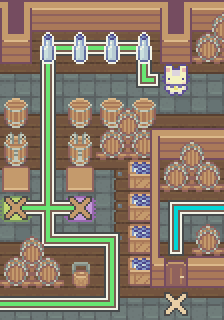
Fill and store wine bottles by using object inheritance with your classes.
This room is used to fill wine bottles, there are few that still need to be bottled and packed, this is best achieved by using classes. Classes will allow you to create objects that can posses various traits, in this case different kinds of wine bottles. Objects created using classes can inherit traits from other classes, these are called child classes while classes that are used as a base for creating more classes are called parent classes.
# Parent Class

class wine_bottle:

  color = ""

  def set_bottle(self):
    player.place("empty bottle")

# Child Class

class fill_bottle(wine_bottle):

  def fill_bottle(self):
    player.combine(["empty bottle", self.color + " wine"])
    player.speak("The bottle's color is: %s" % self.color)
    player.collect(self.color + "bottle")
There are two (2) classes set up for use, the parent class is used to place a bottle in front of a barrel to be filled, the child class is used to combine and set the wine bottle. The child class inherits the properties from the parent class allowing you to create variations of the bottles without too much effort.
First walk and collect the four (4) empty bottles on the top of the map. Once you have them walk to the dark X marks on top of the colored carpets and face the barrel dispensers. There are four (4) colored carpets, representing the color of wine you need to create in that area, these being: "green" , "blue" , "purple" and "yellow" .
At the dark X marks, create an object using the child class, for example: green_bottle = fill_bottle(). Name the object according to the bottle you’re trying to create, once it’s done set the object’s color and activate it’s functions.
# Green bottle setup

green_bottle.color = "green"
green_bottle.set_bottle()
green_bottle.fill_bottle()
Do this for all four (4) wine bottles on their respective X marks. Once they’re all set and the bottles have been collected, walk to the light X mark and open the door to the wine cellar using the open() function, like this: player.open() . Next walk to the gold X mark in order to store the bottles you created in a wine rack.
Place all the bottles in a list named bottles and while facing the wine rack use the place() function to store the list in order to complete the level. There are four (4) bottles you’d have collected: "green bottle" , "blue bottle" , "purple bottle" and "yellow bottle" .