 Coding for Kids
Advanced Python Development Course
In this chapter we’re going to explore new types of functions, various uses for them and how to make the most of them when coding in Python.
In this level we start off with polymorphic functions, there are functions that can be used with a variety of different data types. This is like using the same function to do different things, a universal function.
Objective
Check the status of the crops and piglets, and confirm supply shipments using polymorphic functions.
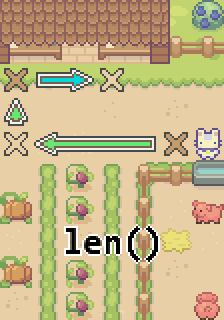
Very soon there should be some crops that need to be harvested so they can be shipped out to be sold. The piglets also need to have food delivered, it would be a good idea to see how much food needs to be ordered. To accomplish these tasks you can use polymorphic functions, in this case we’d be using the len() function.
Polymorphic functions are functions that can be used with multiple different data types. For example, the len() function is a function used to calculate the length of objects, these objects can be different data types such as lists, dictionaries and even stings. Start off tacking the tally on the lower X marks in the field before moving to the higher X marks in the shed.
There are several piglets inside a pen by the road, their names are "Peggle", "Peter", "Piper", "Pedro" , put their names in a list so you can tally them. Like this: piglets = ["Peggle", "Peter", "Piper", "Pedro"] . Create a variable named number to store the length of the list by using the len() function, like this: number = len(piglets).
Once you have set up the list and variable , walk to the dark X mark in front of the piglet pen, face the pen and use the speak function to count the piglets using the speak() function. Use the number variable to get the result, like this: player.speak("There are d% Piglets" % (number) )
After you’re done checking in with the piglets, walk to the light X mark by the field, face the crops and count them. There are three(3) different types of crops: "Tomatoes" , "Pumpkins" , "Eggplant". Count how many crops are growing of each and store them inside a dictionary, like this:
crops = {}

crops["Tomato"] = number of tomato crops

crops["Pumpkin"] = number of Pumpkin crops

crops["Eggplant"] = number of Eggplant crops
Once you’ve populated the dictionary with the proper values use the speak() function in conjunction with the len() function to count the number of crops available, like this: player.speak("There are d% types of crops" % ( len(crops) ) ) .
Once you’ve counted both the piglets and the crops, walk to the dark X mark on the purple mat to check orders for crops to be shipped out. There is a variable constant named order that holds a string containing the orders for crops that need to be shipped out. We need to find out what the orders are and how many orders we have, we can do this by using the speak() function and unpacking the string as well as using the len() function.
player.speak( [*order] )

player.speak("There are d% orders of crops going out"
% ( len(order) ) )
By putting the string variable inside brackets and a * we can activate an operator to unpack the string, for example: [*string] . What this does is that it takes a string and separates each individual character putting it in a list, an example being: [*string] will output a list['s', 't', 'r', 'i', 'n', 'g'] . In the case of using len() on a string, it will count how many characters a string has.
To conclude the exercise, walk to the gold X mark on the right side of the shed, and determine how many pounds of food need to be delivered for the piglets. Create a variable named food , as a value, use the variable number that you created earlier and multiply it by 35 to determine the amount of pounds, like this: food = number * 35 .
While facing the shed, use the speak() function in conjunction with the variable food to determine the amount of food being delivered, like this: player.speak("There are d% pounds of food coming in" % (food) ) .