 Coding for Kids
Advanced Python Development Course
Chapter 4
>
Level 1
At times you will want to make your python code run only after a specific criteria is met rather than have code run all in one go, this can be accomplished by using async functions. The name of this type of function is a shortened from the word asynchronous and they are called by adding the await expression before a function.
In this level we will be learning how to write our own messages and display them as popups. By adding await , we will be able to pause the code enabling you to read the message you wrote and resume the code only after closing out of the popup.
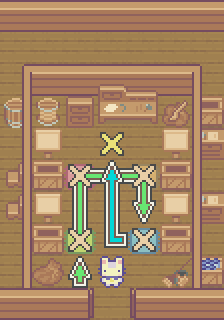
Objective
Label signs so they display a message using await/async functions.
The signs in the storeroom don’t have any label, the materials were recently placed and had not been set up. It would be a good idea to write in messages for each label and tally all the items you reviewed by using the await/async function write().
Walk to the light X marks face the crates and use the speak() function to identify the contents of the crates. There are four (4) constants, one for each of the crates, these being: green_crate , blue_crate , red_crate , and orange_crate, these correspond to each of the colored carpets in front of each crate.
Once you identify the contents of a crate, use the write() function to write a message on the sign. The crates will have four (4) different types of vegetables : "potato" , "onion" , "corn" and "carrot" , write them out with the function, like this: await player.write("potato").
The await code is added to identify the function as an async function. Functions of this type can run simultaneously with other processes in your code. This is useful when you want to pause your coding and have it wait for something to take place such as a button being pressed or a command coming from online. As such, this is why the await command is added, in the case of the write() function, it is to pause the program in order to display a message.
Once all crates have had their messages written on them, walk to the Gold X mark at the end of the storeroom to tally up the number of items in each crate. Create a list with all constants and use the write() function to write a message in order to complete the level.