 Coding for Kids
Beginner Coding with Blocks
Chapter
>
Level
Advanced Lists and Data Structures
Creating Nested Lists
While there are many tools at your disposal for writing code more efficiently, different circumstances have different best practices. Nested lists (dictionary-like structures) are another way to store values, they are similar to lists but in this case hold both a key and a value for each item.
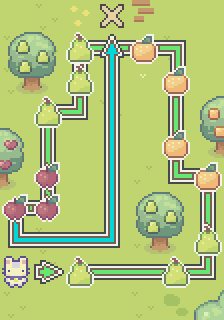
Grab all the fruit in this field and use a nested list structure to store them all, that is both their name and how many you managed to grab. Try it out!
Objective
Pick up all the fruit and store it in a nested list, then count how many you've grabbed.
There are various fruits scattered in the forest, it be best to pick them up, these being: "Apples", "Oranges" and "Pears".
While variables and lists are efficient ways to store values for later use, another way to effectively store values is using nested lists (dictionary-like structures). These are similar to lists but rather than just hold a single value, they hold both a value and a key (index) for the value.
Use the set dict value block to create and populate a nested list structure named bag. For each fruit type, use set dict value with bag, the fruit name as the key (e.g., "Apples"), and the number you picked up as the value.
The above code will store the name of the item in the nested list structure and use it as a key; in this case, the key will have a number tied to it which represents the value of how many of that item you've grabbed.
Once you're done grabbing the fruits and putting them in the nested list structure, count them by walking over to the X mark and using the speak block with the bag variable, much like this: use the speak block and connect the bag variable to it.