 Coding for Kids
Beginner Coding with Blocks
Chapter 6
>
Level 1
There are times you may wish to add conditions to certain actions you take, this would allow your blocks to be flexible and perform different actions depending on the situation. For this we use if blocks in combination with comparison blocks to test certain conditions and perform appropriate actions.
In this first exercise, collect egg baskets and use the comparison block with the operators: equals = , not equal ≠ , and greater than > to check if the contents of the baskets are the same or different from one another. The if block with an else section allows you to run different code based on whether a condition is true or false.
Objective
Collect eggs and compare them using
comparisonblocks in anIfblock.
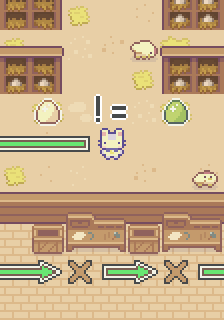
It would be a good idea to collect eggs and run inventory on what you’ve gathered. Walk through the coup and collect all the egg baskets then use comparison blocks in order verify what you’ve gathered.
There are three (3) X marks in front of the desks bellow, here we will be using If blocks, these blocks are used to perform actions based if a condition is met or not, for example if something is true or false.
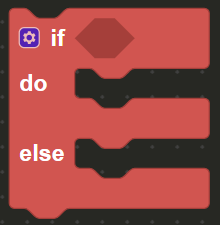
There are three (3) if blocks, and associated movement blocks, deactivated in the block editor. The If blocks are fitted with comparison blocks, these blocks allow you to compare two (2) blocks to each other.

The comparison blocks allow you to check if two (2) block values are: equal = , not equal ≠ , greater than > and several other similar operators. Activate the If blocks as needed, they contain speak blocks that activate depending if the comparisons are true or false.
Once you’ve collected the three (3) baskets you will have obtained three (3) constants: basket1, basket2 and basket3. Walk over to the X marks, on the first dark X mark, face the table, here we’ll be comparing if the contents of each basket are the same.
From the Constants menu, insert the basket1 block & the basket2 block into the comparison block. Set the middle dropdown on the comparison block to = in order to check if the number of eggs in each basket is the same.

Walk to the light X mark and face the desk, here we’ll be using the comparison block to verify if the egg baskets are not equal to each other. From the Constants menu, insert basket2 & basket3 in the comparison block docked to the second If block and set the drop down to ≠ in order to compare and verify the contents of the baskets.

Lastly walk to the gold X mark and face the desk, here we’ll be comparing if basket1 is larger than basket3. Enable the last If block and insert baske1 & basket2 into the comparison block. Set the drop down to > in order to check if the basket1 has more eggs than basket3 in order to complete the level.
