Coding for Kids
Beginner Coding with Blocks
Chapter 6
>
Level 2
Objective
Collect items in the field and combine them by using condition operators.
There are several fruit ingredients in the field we could use to mix and form several preservatives. To do this we need to ensure we have all the ingredients necessary as well as the right amounts of each in order to perform a mixture. In order to accomplish this we will use if blocks, but this time use more advanced comparison blocks and segments.
Start off by collecting all the materials in the warehouse, these include various fruit and containers including: jar, milk, grapes, red berries and strawberries. With these items we’ll be able to mix and produce two (2) large jars, one of Grape Jam and another of Berry milk.
Once all items are collected walk to the cark X mark located at the top and face the blanket, here we will be mixing items to produce grape jam. In the Block editor there are several disabled blocks including if blocks and movement blocks. Enable the first if block which we will be using to verify the ingredients before mixing.
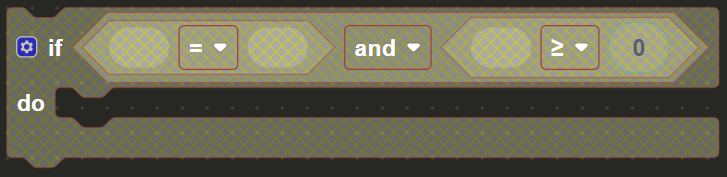
There are several blocks already added to the if block including two (2) comparison blocks and one (1) and block. These blocks will be used to compare and verify the mixture. The and block has the comparison blocks inserted into it and is used to check that both operations are met before combining the items.

All acquired items have been consolidated into constants which are located in the Constants toolbox menu. In the first comparison block, insert the jar variable constant and make sure the operator is set to = , in the inserted string block add the word “true”, this verifies if the jar to put the mixture in has been acquired.

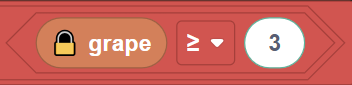
On the second comparison block we’ll processing the grapes, we need three (3) or more in order to make the jam. Insert the grape constant in the left side of the comparison block , on the right hand number bubble set the number to three (3). Make sure it’s set to ≤ so that we check that we have three (3) or more grapes on hand in order to produce the Jam.
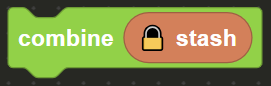
Now that we have the if block set up, drag & drop the combine block from the Actions menu and insert it into the if block. A constant named stash is found in the Constants menu which holds all the items you’ve collected. Add the stashconstant into the combine block in order to produce the grape jam using the ingredients you verified.
Once the jam was been created walk to the light X mark at the bottom and face the blanket. There are some deactivated movement blocks you can enable in order to proceed to the location. Here we will have two ifblocks that cascade by being inserted into each other which you can also enable in the editor.
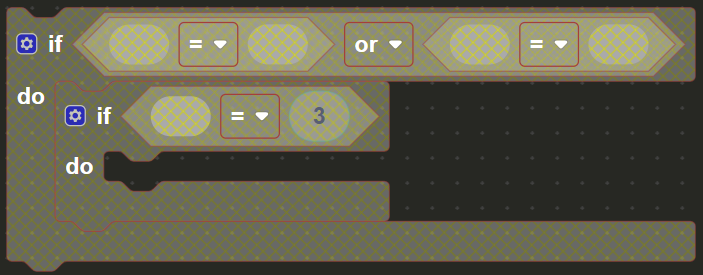
Here we’ll be producing berry milk, in the first if block we’ll be checking if we have the correct berries in order to create the mixture. In the if block we have an or block which is used to verify if at least one of two block sequences are met. We’ll have two comparison blocks inside the or block in order to verify.

In the first comparison block insert the berry and red_berry constants, this checks if the berries available are red berries since the operator is set to =. Do the same with the second operator block, instead with the berry and strawberry constants. This way if the berries are either red berries or strawberry you will be able to make the berry milk.

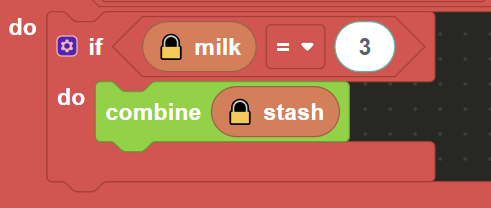
On the second if block inserted inside there is an comparison block, here we will verify if there is enough milk to produce the berry milk, drag & drop the milk constant into the comparison block and make sure the number bubble block is set to 3 and the operator set to =. Insert a combine block from the Actions menu and once again insert the stash constant in order to combine the milk and berries available now that they have been verified and complete the level.