 Coding for Kids
Beginner Coding with Blocks
Chapter 6
>
Level 3
Objective
Find if ingredients stored in containers and combine them to make food.
You need several ingredients to be able to make a salad but you need to collect them first. You'll find carrots, tomatoes, lettuce and cucumbers in the field, carrots and cucumbers however are stored away. Collect the items you can grab in the garden to the right.
In order to find the missing items head to the gold X marks in front of containers and test conditions to check if the items are stored in a container. Once at the gold X mark turn left facing the hallway in order to execute a loop. Use a for loop block to make the process quicker and more efficient at collecting items, enable the disabled block in the block editor.
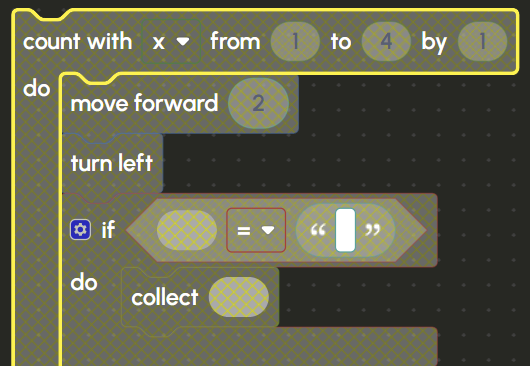
The crates in the storeroom have items, these items are represented by list constant named bag, it has four (4) items, one for each crate. Use the for loop block with a variable x that goes from 0 to 4. Inside the loop, you have two if blocks to check if "carrot" or "cucumber" are in the bag constant.

Drag & drop the in list block from the lists menu into the comparison block inside the if block. Insert the bag list constant inside the first slot in order to check if the items are inside the crates, set the first drop down to get, and the second drop down to #. Finally insert the x variable from the Variables menu and put it in the last slot, what this string of blocks does is that it searches the bag list based on the number of cycles the loop has outlined by the x variable which corresponds to what crate you’re facing.

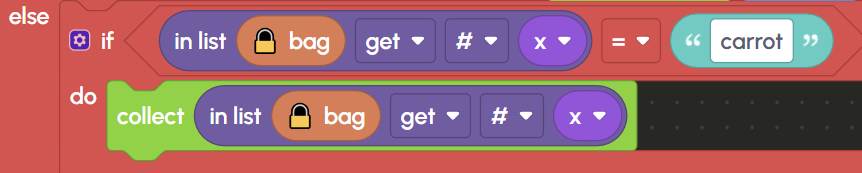
This in list block sequence will be used four (4) times in the two if blocks. In the first if block, place the in list inside the the comparison block set to = and write on the string block the word “cucumber”. On the collect block insert another in list in order to collect a cucumber if it’s present in the crate.

On the second if block use the same structure as you did in the first but instead write “carrot” in the string block. These two if blocks inside the for loop will cycle your character through a loop that has it check all four (4) crates and searches if they have either a “cucumber” or a “carrot” and collects them.
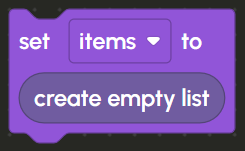
Once you collect all items, store them inside a list named items using the create empty list block, do this by having a set variable block, adding the items variable and inserting the create empty list from the lists menu.
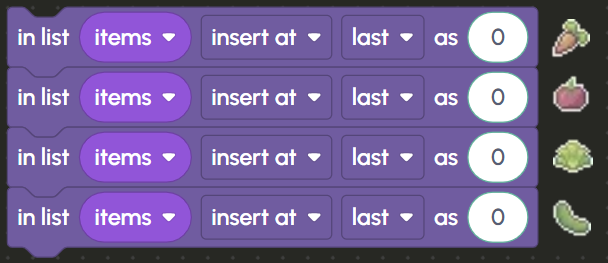
In the editor there are deactivated insert list blocks for inserting items into the items list. Activate them and insert numeric values corresponding to the items you’ve gathered by editing the number bubble at the end of the block. The order of items goes as follows: “carrots”, “tomato”, “lettuce”, “cucumber” , insert the values corresponding to each one.
Finally, walk to the light X mark and combine all items for a meal using the combine block. Insert the items list into the combine block in order to place all the veggies into the salad container and complete the level.