 Coding for Kids
Beginner Coding with Blocks
Chapter 6
>
Level 4
Objective
Clean out some weeds in the passage between buildings using nested conditions in loops.
The passage between buildings has weeds growing, It would be a good idea to gather all the weeds and dump them. There are ways you can automate this process by using conditions inside loops. There are several blocks in the editor that are disabled that you can enable in order to fill in the gaps.
Create a variable named bag and set it to 0 using the set variable block.
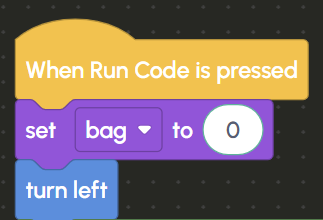
Use a while loop with a condition to automate the process, insert a comparison block inside it. Set the comparison block to check if bag is less than 10 , by setting the drop down to >.

Inside the loop, add a move forward block and drag & drop the change variable block from the Variables menu. Set the drop down to bag and the number bubble to 1.
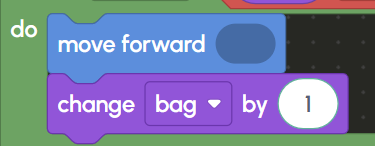
By using a condition in the while loop, the loop will continue as long as the condition is true. Each loop cycle adds a weed to the bag and the loop automatically stops when bag reaches ten (10).
Walk to the first dark X mark and face the crate, in the two crates positioned we will dump the weeds we collected. Use a for loop with the place block at the X marks. The amount of steps between each container is uneven though as there is a gap in between. By using nested if blocks inside the loop, you can skip certain code when a condition is met.
Use a for loop block with variable x from 0 to 2 and increments by 1. Inside the loop, have a move forward block then use an if block set up with a comparison block. Inside the comparison block set the first slot to x , the drop down to not equal (≠) and the numeric value to 1.
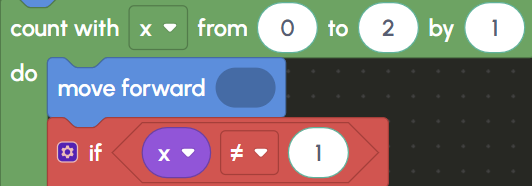
Enable the disabled blocks inside the if block and in the place block fill out the operators block in order to establish the amount of weeds to deposit in the containers. We need to put half of the weeds that are collected and stored in the bag variable in each container. In order to do this, we need to insert the bag variable block from the Variables menu into the first slot of the operators block, set the drop down to % and insert 2 in the number bubble.
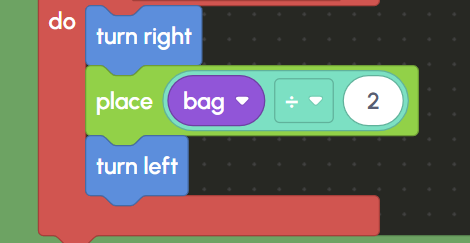
Only when x is not equal to 1 (i.e., when x is 0 or 2), the code to turn right, place weeds, and turn left will be executed. This way you skip the middle iteration (when x is equal to 1) to avoid the gap between containers.
Once you've collected and placed the weeds in the proper location, reach the exit marked by a star to complete the level.