 Coding for Kids
Beginner Coding with Blocks
Chapter
>
Level
Functions and Procedures
Creating Functions
While there are a whole bunch of functions already available to you in order to perform all sorts of actions, you can expand the actions you can perform by creating and using custom functions. These allow you to reuse the same block of code in multiple areas of your program with a single line of code.
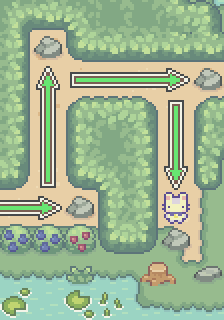
Custom functions allow you to simplify your code and and cut down the amount of code you need to write down. Using a custom function, push the rocks in this field and reach the exit using no more than 22 lines of code.
Objective
Push rocks to reach the exit writing no more than twenty two (22) lines of code.
There are several ways to save time coding, sometimes you'll want to reuse the same strip of code multiple times. In previous chapters we introduced loops and lists to make code more efficient, another way to make code more efficient is creating custom functions.
Use the define function block to create a function named repeat_push. Inside the function, add blocks to push, move forward, push, move forward, push, move forward, push, and move forward. This function will push an object and move forward four (4) times.
The above function is a custom function which will run the code inside it. With this the player will push an object and move forward four (4) times each time the function is called.
Use this custom function by calling it with the call function block, to move the rocks in the field and reach the exit. Do this while writing no more than twenty two (22) lines of code.