 Coding for Kids
Beginner Coding with Blocks
Objective
Traverse the forest path and reach the exit to complete the level.
How can you get across the forest? By using Blocks of course!
Blocks are visual programming commands that influence the world around you. These blocks are dragged and connected in the block editor below.
Blocks represent actions your character can perform in the game world. Each block has a specific purpose and can be connected to other blocks to create a sequence of actions.
Blocks are executed one by one, from top to bottom - meaning that the order is important.
The following blocks are available to you:
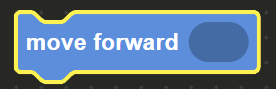
- To move forward, use the
move forwardblock.
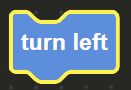
- To turn left, use the
turn leftblock.
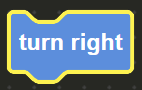
- To turn right, use the
turn rightblock.
The white X mark displayed after you first move represents your start position, the star at the end of the path represents your end goal.
Once you finished arranging your blocks, press the Run button below to execute all blocks one by one.
Try it out!