 Coding for Kids
Beginner Coding with Blocks
Objective
Collect all four berries in map to complete the level.
Let's get something to eat, those berries look tasty.
You can walk over them to collect them, you may think it will take a lot of blocks but there's an easier way.
Use the number field on the move forward block to specify how many steps you'd like to take.
You can enter a number directly in the block to increase the number of steps you take in one action.
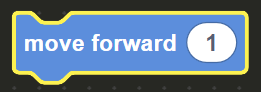
This is called a block parameter. Block parameters are values that you set on a
block to influence its behavior. For the move forward block, the parameter is the number
of steps you want to take.
Simply click on the number field in the move forward block and type the number of steps you want. Helpful right? You're welcome!
Navigate around the bushes by using turn_left & turn_right blocks and collect all four sets of berries in order to complete the level.
If you run into any trouble, check the top dashboard over the game map:

This Dashboard gives you access to four (4) tools to help you in your exercise:
- Speed: Can be set to Normal , Fast and Turbo
- Map info: Gives you information on how to control the map using different devices
- Help: Gives you useful hints on how to complete the level
- Code Book: Shows you all the different code blocks you can use and their specific functions