 Coding for Kids
Beginner Coding with Blocks
Chapter 4
>
Level 1
Loops are blocks you can use to repeat the same actions. This makes it easier for you to complete tasks in the game without having to place long lists of blocks. There are two types of loops: while loop blocks and repeat blocks which we will be exploring in the following levels.
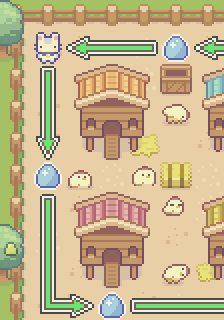
There are five (5) eggs in this map, you can pick them up with only a few blocks using a while loop block. Try to grab all the eggs by repeating the same two movement blocks four times.
Objective
Grab all the eggs in the barn by only using six (6) blocks, using the while loop block.
The chickens laid their eggs everywhere! Walk through the barn and collect all the eggs quick!
In order to reduce the amount of blocks you need to use and make coding a lot less tedious you can use loops! These are blocks that allow you to repeat the same actions eliminating the necessity for placing the same blocks over and over again.
A while loop block is one such loop where you can set blocks to repeat while a certain condition is true.
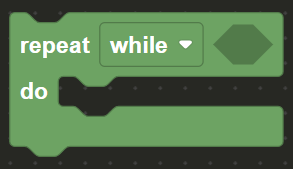
A variable named count is set up in the block editor to determine how many times you wish for blocks to loop. It’s used to set the loop’s condition.
A while loop block with a comparison block is set up in the code editor to check if count is less than 4. Place your movement blocks inside the while loop block, and use the change variable block to increase the count by 1 each cycle.
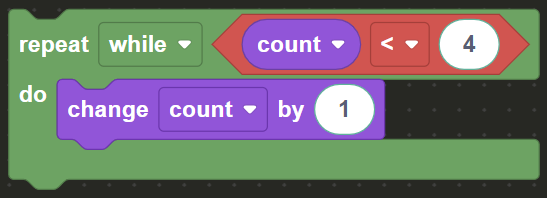
In this example the while loop block checks if count is less than 4. count starts off as 0 and increases by 1 each cycle until it reaches 4. Any blocks you place inside the while loop block will be repeated, in this case four (4) times.
Place move forward with the correct number of steps and turn left blocks inside the while loop in order to repeat the block sequence four (4) times in order to walk around the coup in order to collect all the eggs.
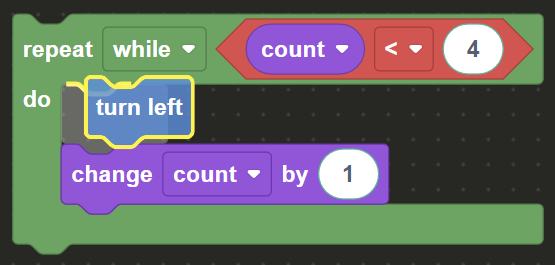
Be warned, loops can run forever if not stopped, so be sure to include the change count by block, otherwise it may trigger an error.
Try it out! Collect all five (5) eggs and complete the level by only using six (6) blocks total in the block editor.