 Coding for Kids
Beginner Coding with Blocks
Chapter 3
>
Level 2
Objective
Collect eggs and balance the books by multiplying and subtracting their quantities.
It's time to collect some eggs in the nesting grounds, walk over and grab the various eggs in the field so we can document how many eggs were laid. You’ll be documenting how many good eggs you have, and what their nutritional value is.
Once all eggs are collected, create a variable name total , do so by clicking the create variable button in the Variables menu and entering “total” in the dialogue. Once the variable has been created, drag & drop the set_variable code block and drag & drop a number bubble from the Math menu, inserting it into the set_variable code block. Set the total variable to the amount of white, dark and red eggs you’ve collected.
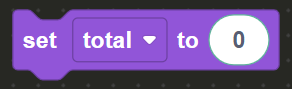
Walk to the dark X mark and face the counter, here you will be verifying how much nutritional value the eggs have. Each egg is worth 90 calories, multiply the total variable by 90 using the operators code block. On the Math menu in the toolbox, drag and drop the operators code block and set the operator to multiply x by clicking the middle drop down and checking the multiply symbol.
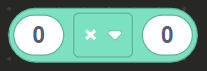
Grab the total standalone variable from the Variables menu and insert it in the operators code block. Drag and drop the speak code block from the Communications menu and add the populated operators code block in order to announce the result.
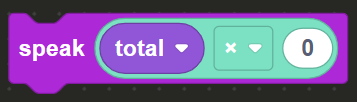
Set the number bubble to 90 effectively forming the math equation: total x 90 = result. Now you can determine how many calories all the eggs provide all together.
Walk to the light X mark in order to partition red eggs from the rest of the eggs batch. In the Variables menu in the toolbox, click on the create variable button and create a variable named red_eggs (don’t forget the underscore _ ). Drag and drop the set_variable code block, add the red_eggs variable, drag a number bubble and set it to the number of red eggs you’ve collected which is outlined on the top right of the screen.
Now drag & drop the operators code block from the Math menu and set the operator to - in order to subtract values. In the Variables menu on the toolbox, drag & drop the standalone total and red_eggs variables onto the operators code block.
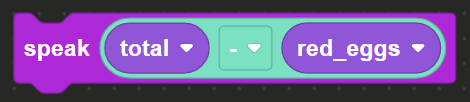
Drag & drop the speak code block from the Communications menu and place the operators code block into the speak code block in order to announce the partition of eggs and complete the level.