 Coding for Kids
Beginner Coding with Blocks
Chapter 3
>
Level 4
Objective
Take basket of eggs and store the eggs in containers before addressing how many eggs you stored.
In this level, you'll use a constant named egg_basket which represents the number of eggs in the basket. Constants are like variables that are already set for you, they can be used but not changed. You'll find egg_basket in the Constants menu, and work like other variables.
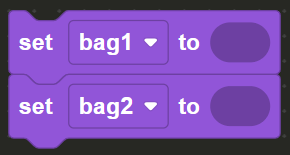
Create two variables named bag1 and bag2 by pressing the create variable button in the Variables menu, we’ll be using to store half of the eggs in each bag. Drag and drop two (2) set_variable blocks and set them to bag1 and bag2 .
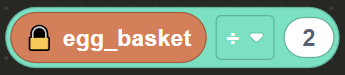
In the Constants menu in the toolbox you can find the constant egg_basket as well as the operator block set up with the constant. Drag & drop two(2) operators blocks with the egg_basket constant from the Constants menu and set the operator to ÷ in the drop down menu.
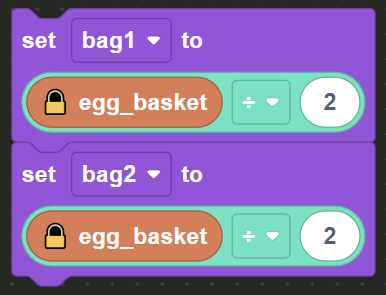
Drag & drop the two operators blocks and place them inside the set_variable blocks you created. In the operator block and set the number bubbles to 2 . This will divide the basket of eggs and store each half in the bag1 and bag2 variables.
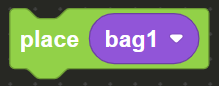
Head for the dark X marks and face the containers, use the place block to put the bags in each container. On the first dark X mark from left to right, drag and drop the place block from the Actions menu and insert bag1 to place it in the box. On the second dark X mark drag & drop the place block and insert bag2 .
Afterwards head for the light X marks in front of the tables and use the speak block to express how many eggs you have. On the first light X mark, express how many eggs you have total by using the speak block with a create text block. Click the gear icon on the create text block to add more items a third item and insert: a text block with "There are ", the egg_basket standalone variable, and another text block with " eggs".
A disabled template of this process is in the block editor, you can activate and edit it by right clicking on the speak block and clicking "Enable Block".
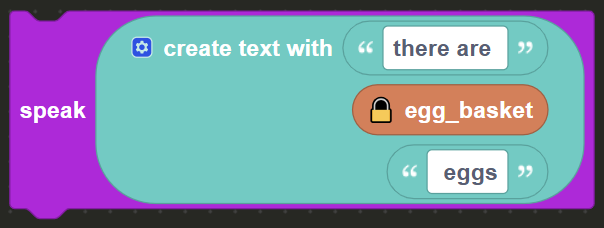
On the final light X mark, express how many eggs are in each container by using the speak block with a create text block, insert two more slots in the block.
Insert in the create text block: text block with "There are ", the bag1 standalone variable, a text block with " eggs in bag 1 and ", the bag2 standalone variable, and lastly a text block with " in bag 2". Be sure to have proper spacing for the text.
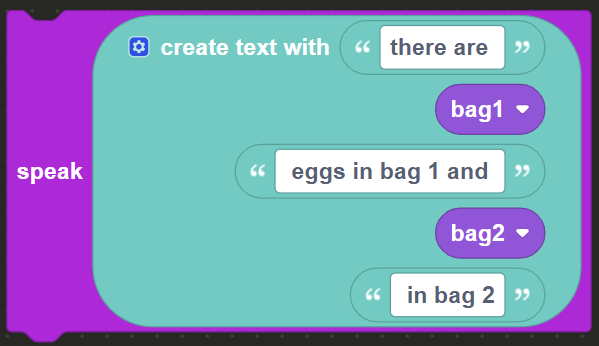
Once the the information has been charted down on the desks the level will be complete.