 Coding for Kids
Beginner Coding with Blocks
Chapter 2
>
Level 6
Objective
Collect wheat in the field, store it in a variable and place it in the chest then close it to complete the level.
Collect the grain in the field and put them away.
Pick up all the grains on the field by walking over them, once you pick them up create a variable named wheat by clicking the create variable button on in the Variables menu in your toolbox.
Set the wheat variable using the set variable block, add the variable and set it to the number of grains you picked up.
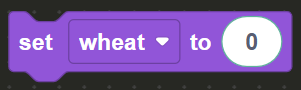
Once the variable is ready, walk to the X mark in front of the open chest, face the chest. Store the grain by using the place block.

Drag and drop the place block located in the Actions menu in the toolbox. On the Variables menu in the toolbox, drag and drop the wheat standalone variable on the block editor. Place the variable on the place block in order to store the wheat inside the chest.
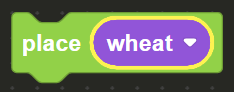
Once you're done putting the wheat away, close the chest using the previously learned close in order to complete the level.