 Coding for Kids
Beginner Coding with Blocks
Chapter 2
>
Level 7
Objective
Pick up items, store it in a string variable, open the chest to place the variable in it’s own container and close them to complete the level.
Store the harvest in a bag and put it away. There is a "Pumpkin" you must collect and store it in its own bag by using variables.
Walk through the field and grab the pumpkin by walking over it. Create a variable named bag1 by clicking the create variable button on the Variables menu in the toolbox. Drag and drop the set_variable code block from Variables menu in the toolbox and add bag1 as it’s variable.
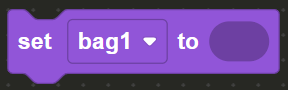
Then on the Text menu in the toolbox you can find string bubbles. The text inside these code blocks are called strings.
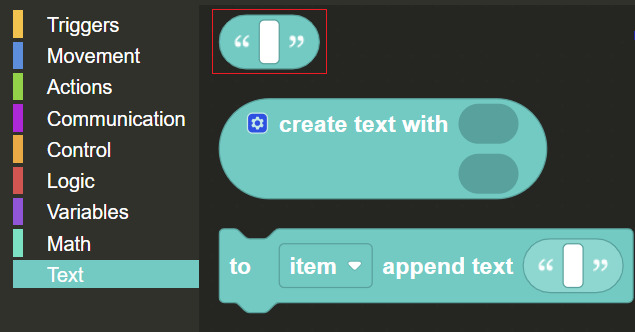
Drag and drop string a bubble and add it to the set_variable code block.
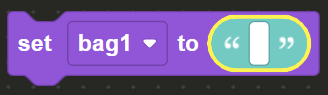
Add the string "Pumpkin" to the bubble on the set_variable code block, exactly as written (remember the capital P). This effectively puts the pumpkin in the bag allowing you to store it, or in coding terms, sets the string as the value for the variable.
Next you’ll be using the Open , Place and Close blocks from the from the Actions menu in the toolbox. Walk to the X mark and while facing the chest, use the Open code block to open the chest, use the Place code block and add to it the bag1 variable code block from the Variables menu. This will place the bag in the chest.
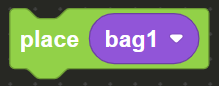
Once the bag has been stored in the chest, use the Close code block to close the chest and complete the level.