Coding for Kids
Beginner Coding with Blocks
Chapter 5
>
Level 2
Objective
Place several supplies in lists and combine them together to form a new product.
It would be a good idea to prepare a dressing for the salad you're planning to have for dinner later. There are 4 different types of items in the field: milk, cream, lettuce and radishes. Grab all the items and combine them into a mixture to form Radish dressing.
First grab the milk and cream.

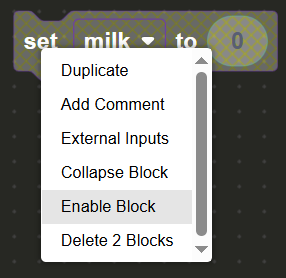
There are deactivated set variable blocks in the block editor with the variables milk and cream, enable the deactivated blocks by right clicking them and selecting the option from the dropdown then add the amount you’ve collected of each to the set variable blocks.
Next grab the lettuce and radishes.
There are deactivated set variable blocks in the block editor with the variables lettuce and radishes, enable the deactivated blocks by right clicking them and selecting the option from the dropdown then add the amount you’ve collected of each to the set variable blocks.
Once all items on the map have been collected, create a variable named mixture by clicking the create variable button in the Variables menu. Drag & drop a set variable block and set the mixture variable.
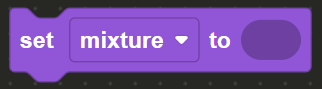
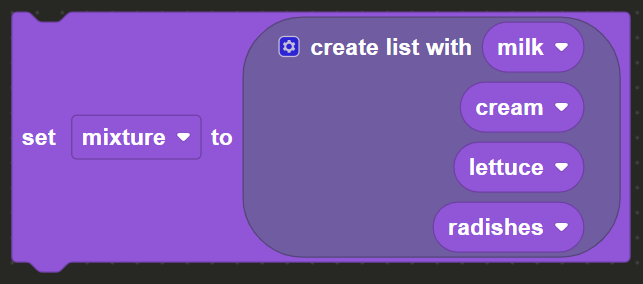
Here we will create a list, in the List menu, drag & drop the create list block and insert it in the set variable block. The list must contain all four of the variables you created previously, those being: milk, cream, lettuce and radishes. However the base create list block only has three (3) slots. To add additional slots click the small gear on the top left of the block.
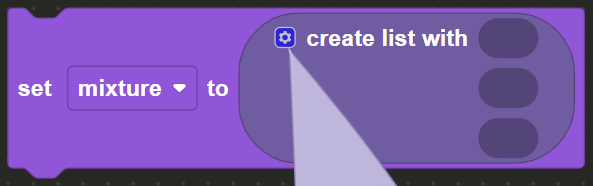
Drag a list block into the tower of blocks in order to add a fourth block.
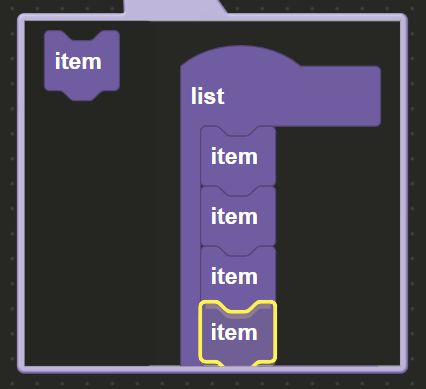
Now that the block has for slots insert the four (4) variables: milk, cream, lettuce and radishes in order to complete the list.
Finally walk to the X mark and face the blanket, use the combine block from the Actions menu in the toolbox. Insert the mixture list into the combine block in order to complete the level.