 Coding for Kids
Beginner Coding with Blocks
Chapter 5
>
Level 4
Objective
Assess information about fruit crates and transfer apples into basket.
Out in the garden some freshly picked fruit is stored in crates, it would be a good idea to grab some extras and place them in a basket so they can distributed. To do this we’ll be using a few new blocks including the display block to view the contents of lists.
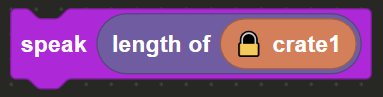
There are two lists constants named: crate1 and crate2 which hold fruits that have been collected in the garden. Walk to the dark X mark and face the crate, here we’ll be checking how many fruit types are in the crate by checking the length of the crate1 list constant.
From the Communications menu, drag & drop the speak block onto the editor, now from the Constants menu we have a variety of blocks. Drag & drop the length block which is attached to the crate1 constant attached to the block and slot it into the speak block.
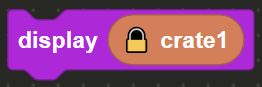
Now let’s identify what elements are inside the list constant by using the display block which is found in the Communications menu. Drag & drop the block into the editor and insert the crate1 list constant from the Constants menu in order to view the list constants.
Next walk to the light X mark and face the crate, here we’ll be checking if the crate2 list constant contains the fruit “Apple” and where it’s located in the list. Place a speak block in the editor and drag & drop the occurrence block from the Lists menu into the speak block.

In the first slot insert the crate2 standalone block from the Constants menu and in the second slot insert a string block from the Text menu and write the text “Apple”. This will allow you to find where the “Apple” is located in the crate2 list constant.

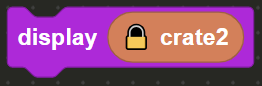
Identify what the contents of crate2 are by using the display block, drag & drop the display block from the Communications menu and insert the crate2 list constant which is located in the Constants menu.
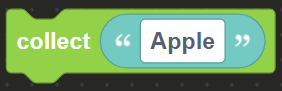
Now that we know of the contents of the crate and where the “Apple” is located, use the collect block from the Actions menu and add to it a string block from the Text menu. From there write the word “Apple” as written in the string block in order to pick up the apples from the crate.
Finally, walk to the gold X mark and face the basket, here we will place the apples. Use the place block from the actions menu and enter a string block from the Text menu. Enter the word “Apple” as written in the string block in order to store the apples in the basket and complete the level.