 Coding for Kids
การเขียนโค้ดสำหรับผู้เริ่มต้นด้วยบล็อก
บทที่ 3
>
ระดับ 1
คุณรู้ไหมว่าคุณสามารถบวก (+), ลบ (-), คูณ (*) และหาร (/) ระหว่างการเชื่อมบล็อกได้? ใช่เลย! ในบทนี้เราจะสอนคุณวิธีใช้งานฟีเจอร์นี้ (operators) รวมถึงวิธีเจ๋งๆ ที่คุณสามารถนำไปใช้กับสิ่งที่คุณได้เรียนรู้มาแล้ว
มาเริ่มต้นด้วยการนับสัตว์ทั้งหมดในคอกโดยใช้บล็อก speak จากนั้นรวมจำนวนทั้งหมดเข้าด้วยกันโดยใช้บล็อก operators
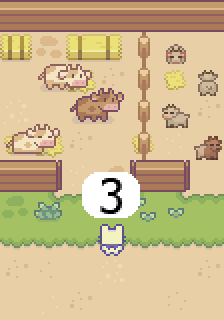
วัตถุประสงค์
Determine how many animals there are in each stable and add them up to complete the level. ให้กำหนดว่ามีสัตว์กี่ตัวในแต่ละโรงเลี้ยงและนำมาบวกรวมกันเพื่อผ่านด่าน
In this stable you will find cows and pigs, determine how many of each animal are located in each pen. There are two variables you need to set up named pigs and cows so they can be modified using the set_variable code block. Create them by pressing the create variable button in the Variables menu in the toolbox.
ในโรงเลี้ยงนี้คุณจะพบวัวและหมู ให้กำหนดว่ามีสัตว์แต่ละชนิดอยู่ในคอกกี่ตัว มีตัวแปรสองตัวที่คุณต้องสร้างชื่อว่า pigs และ cows เพื่อให้สามารถแก้ไขได้ด้วยบล็อกโค้ด set_variable ให้สร้างตัวแปรเหล่านี้โดยกดปุ่มสร้างตัวแปรในเมนู Variables ของกล่องเครื่องมือ
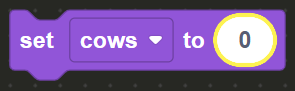
Walk to the X marks in front of the stables, the first stable has cows, count how many cows are in the stable and set the cows variable to how many there are by using the set_variable code block and inserting the number bubble from the Math menu in the toolbox.
เดินไปที่เครื่องหมาย X หน้าคอกสัตว์ คอกแรกมีวัว ให้นับจำนวนวัวในคอกแล้วตั้งค่าตัวแปร cows ให้เป็นจำนวนที่นับได้ โดยใช้บล็อกโค้ด set_variable และใส่ฟองตัวเลขจากเมนู Math ในกล่องเครื่องมือ
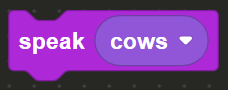
Follow this up by using the Speak code block from the Communication menu in the toolbox and add to it the cows stand alone variable found in the Variables menu in order to announce the quantity.
จากนั้นใช้บล็อกโค้ด Speak จากเมนู Communication ในกล่องเครื่องมือ แล้วเพิ่มตัวแปร cows แบบตัวเดียวที่อยู่ในเมนู Variables เพื่อประกาศจำนวน
Walk to the second X mark and do the same for pigs, count how many there in the stable, set the pigs variable on the set_variable code block and set the amount on a number bubble. Use the Speak code block and drag and drop the pigs variable into it in the same manner you previously did with cows.
เดินไปยังเครื่องหมาย X อันที่สองแล้วทำเช่นเดียวกันกับหมู นับจำนวนหมูในคอก ตั้งค่าตัวแปร pigs ในบล็อกโค้ด set_variable และกำหนดจำนวนด้วยฟองตัวเลข ใช้บล็อกโค้ด Speak แล้วลากและวางตัวแปร pigs ลงไปในบล็อกเช่นเดียวกับที่คุณทำกับ cows
Walk to the final X mark and face the desk, here we will use the sum + operator.
เดินไปที่เครื่องหมาย X อันสุดท้ายแล้วหันหน้าไปทางโต๊ะ ที่นี่เราจะใช้ตัวดำเนินการบวก +
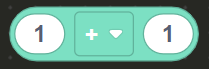
Take a Speak code block and drag it into the block editor. On the Math menu in the toolbox, drag and drop the operators code block and inset it inside the Speak block.
นำบล็อกโค้ด Speak ลากเข้าสู่ตัวแก้ไขบล็อก ในเมนู Math ของกล่องเครื่องมือ ให้ลากและวางบล็อกโค้ด operators แล้ววางไว้ภายในบล็อก Speak
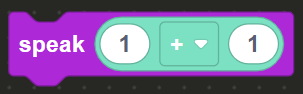
On the Variables toolbox, drag and drop the cows and pigs variables and place them inside the operators code block.
ในกล่องเครื่องมือ Variables ให้ลากและวางตัวแปร cows และ pigs แล้ววางไว้ภายในบล็อกโค้ด operators
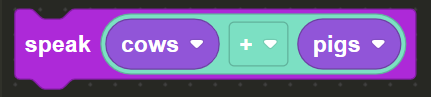
This effectively adds both values you previously set up together , like this: cows + pigs = sum result once the value is displayed on screen the level will be complete.
สิ่งนี้จะบวกค่าทั้งสองที่คุณตั้งไว้ก่อนหน้านี้เข้าด้วยกัน เช่นนี้: cows + pigs = ผลลัพธ์ผลรวม เมื่อค่าถูกแสดงบนหน้าจอด่านจะสำเร็จ