 Coding for Kids
Teacher's Guide
Chapter 10 / Level 1: Compression Modules
Teaching Objective:
- Student learns the practical uses and benefits of compressing data
- Understands the difference between the multiple compression modules and when they’re best used
- Learns how to use the various compression functions and their specific syntax
Guide
In this exercise we’ll be working with compression modules, these are modules used to decrease the file sizes in order to facilitate file storage and transfer. They are as follows:
For fast compression speed and low compression, use the zlib module, by adding import zlib . For our purposes we will be using the following function: zlib.compress() , uses one argument, that being the information you would like to compress. Argument needs to be entered as bites instead of a string.
For medium compression speed and medium compression, use the bz2 module, by adding import bz2. For our purposes we will be using the following functions:
bz2.compress() , uses one argument, that being the information you would like to compress.bz2.decompress() , uses one argument, that being the information you would like to compress. It needs to be entered as bites instead of a string.
bz2.compress(), uses one argument, that being the information you would like to compress.bz2.decompress(), uses one argument, that being the information you would like to compress. It needs to be entered as bites instead of a string.
Arguments needs to be entered as bites instead of a string.
For high compression but slow compression speed , use the lzma module, by adding import lzma . For our purposes we will be using the following classes and functions:
lzma.LZMACompressor() : Class used to create compression objects allowing you to activate a compressor.compress(): uses one argument, that being the information you would like to compress. It needs to be entered as bites instead of a string. Argument needs to be entered as bites instead of a string.
lzma.LZMACompressor(): Class used to create compression objects allowing you to activate a compressor.compress(): uses one argument, that being the information you would like to compress. It needs to be entered as bites instead of a string. Argument needs to be entered as bites instead of a string.
In addition to these modules, we’ll be using the bytes() function, allowing you to convert strings into bytes which will be useful for compressing. It takes two arguments, the string you wish to convert and the format, which for our purposes is 'utf-8' .
The objective of this level is to compress construction instructions, shipments and manifests that have been submitted so they may be transferred or archived. There are three constants containing data that needs to be compressed, these being named red_message , blue_message and green_message.
Start off by walking to the gold X mark over the red carpet, create a variable named red_bytes and convert red_message into bytes using bytes() . Follow this up by creating a variable named red_compression and using zlib.compress() to compress red_bytes .
red_bytes =bytes(red_message,'utf-8')

red_compression = zlib.compress(red_bytes)
Use the pre-written display() function and add the red_message and red_compression variables.
Walk to light X mark over red carpet, create a variable named message_length and use len() with red_message and a variable named compression_length and use len() with red_compression .
message_length =len(red_message)

compression_length =len(red_compression)
Use the pre-written write() function and add the message_length and compression_length variables.
Walk to the dark X mark over the blue carpet, create a variable named blue_bytes and use the same format as you did with red_bytes but populate it with blue_message instead of red_message. Rewrite the blue_message constant with the bz2.compress() function with blue_bytes as an argument. Create a variable named blue_drcompress and and the value of bz2.decompress() with blue_message as a variable.
blue_message = bz2.compress(blue_bytes)

blue_drcompress = bz2.decompress(blue_message)
Use the pre-written display() function and add the blue_message and blue_compression variables.
Walk to the dark X mark over the green carpet, create a variable named green_bytes and use the same format as you did with red_bytes but populate it with green_message instead of red_message. Create a lzma object named compressor and add the function lzma.LZMACompressor(). Create a variable named green_compression and and the value of compressor.compress() with green_bytes as a variable.
compressor = lzma.LZMACompressor()

green_compression = compressor.compress(green_bytes)
Use the pre-written display() function and add the green_message and green_compression variables.
Walk to light X mark over green carpet, rewrite the message_length variable and use len() with green_message and rewrite the compression_length variable and use len() with green_compression .
message_length =len(green_message)

compression_length =len(green_compression)
Use the pre-written write() function and add the message_length and compression_length variables in order to complete the level.
Map overview and path
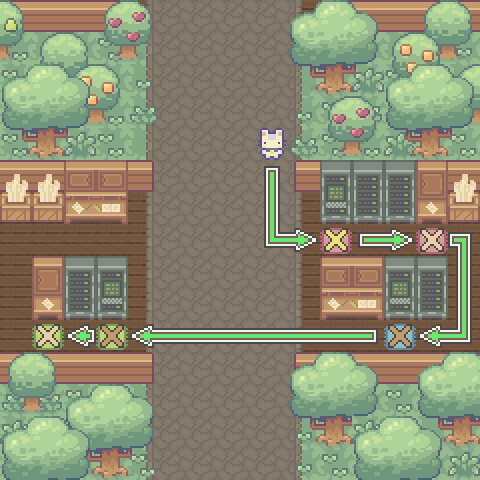
Code Solution
import player
import zlib
import bz2
import lzma

player.move_forward(3)
player.turn_left()
player.move_forward(2)
player.turn_left()

red_bytes = bytes(red_message, 'utf-8')

red_compression = zlib.compress(red_bytes)

await player.display("Message Data:\n%s\nMessage Compression:\n%s\n"
  % (red_message , red_compression))

player.turn_right()
player.move_forward(3)
player.turn_left()

message_length = len(red_message)

compression_length = len(red_compression)

await player.write("Uncompressed Length: %s\nCompressed Length: %s"
  % (message_length,compression_length))

player.turn_right()
player.move_forward()
player.turn_right()
player.move_forward(3)
player.turn_right()
player.move_forward(2)
player.turn_right()

blue_bytes = bytes(red_message, 'utf-8')

blue_message = bz2.compress(blue_bytes)

blue_drcompress = bz2.decompress(blue_message)

await player.display("Compressed Message:\n%s\nDecompressed:\n%s"
  % (blue_message, blue_drcompress))

player.turn_left()
player.move_forward(9)
player.turn_right()

green_bytes = bytes(green_message, 'utf-8')

compressor = lzma.LZMACompressor()

green_compression = compressor.compress(green_bytes)

await player.display("Message Data:\n%s\nMessage Compression:\n%s\n"
  % (green_message, green_compression))

player.turn_left()
player.move_forward(2)
player.turn_right()

message_length = len(green_message)

compression_length = len(green_compression)

await player.write("Uncompressed Length: %s\nCompressed Length: %s"
  % (message_length,compression_length))