 Coding for Kids
Teacher's Guide
Chapter 2 / Level 6: Placing Objects
Teaching Objective:
- Students understand how variables interface with functions
- Learn how to use the
place()function and it’s syntax - Learn how to combine several functions together along with a variable to execute tasks
Guide
To complete this exercise, students need to use various functions in succession.
They must grab all the wheat that’s on the field, the total number will be displayed in the upper right corner of the screen.
Once they’re done collecting them you must store them in a variable. Variables are an easier way to identify objects in game, you can name a variable anything and they can store different types of numbers and text.
wheat = 6
Objects can be stored or placed in a location using the place() function. For the purpose of this exercise you can store objects in a chest by facing the chest and using the place() function with the variable added on it. The location of the chest will be highlighted with an X mark.
player.place(wheat)
After you’re done collecting, cataloguing and storing the wheat, close the chest using the close() function to complete the level.
player.close()
Map overview and path
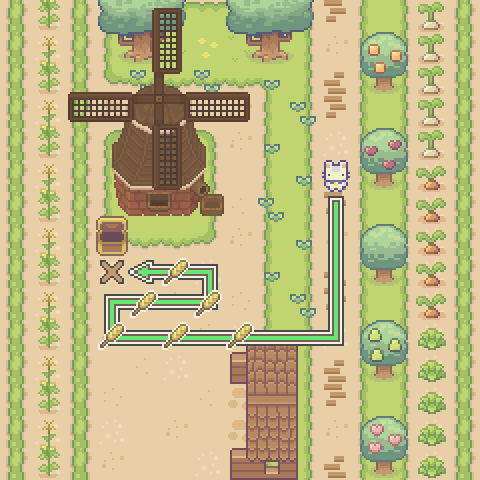
Code Solution
import player

player.move_forward(5)
player.turn_right()
player.move_forward(7)
player.turn_right()
player.move_forward()
player.turn_right()
player.move_forward(3)
player.turn_left()
player.move_forward()
player.turn_left()
player.move_forward(3)
player.turn_right()
wheat = 6
player.place(wheat)
player.close()