 Coding for Kids
Teacher's Guide
Chapter 7 / Level 1: Creating a function
Teaching Objective:
- Learn how to set up a custom function
- Learn how to call and execute custom functions
- Become accustomed to consolidating code using functions
Guide
The goal of this exercise is simply to reach the end of the level by writing no more than 22 lines of code, you can use a custom function to cut down on code. Create a custom function named repeat_push() and place a set of push() and move_forward() commands. This will allow you to execute eight lines of code by only writing repeat_push() .
def repeat_push():
    player.push()
    player.move_forward()
	player.push()
	player.move_forward()
	player.push()
	player.move_forward()
	player.push()
	player.move_forward()
Move towards the rocks and use the repeat_push() code four times in areas that require it in order to reach the star to end the level.
Map overview and path
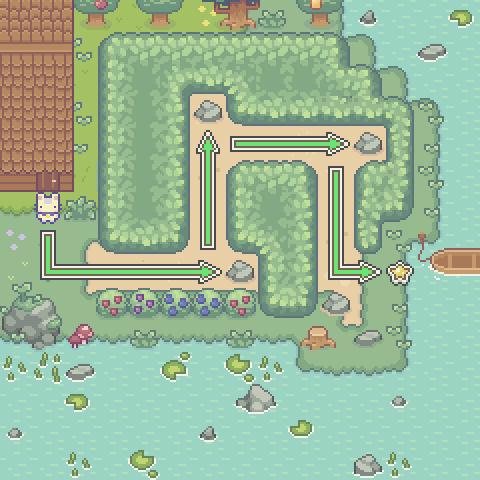
Code Solution
import player

def repeat_push():
    player.push()
    player.move_forward()
	player.push()
	player.move_forward()
	player.push()
	player.move_forward()
	player.push()
	player.move_forward()

player.move_forward(2)
player.turn_left()
player.move_forward()
repeat_push()
player.turn_left()
repeat_push()
player.turn_right()
repeat_push()
player.turn_right()
repeat_push()
player.turn_left()
player.move_forward(2)