 Coding for Kids
Teacher's Guide
Chapter 9 / Level 3: Date/Time Module
Teaching Objective:
- Student learns the nuances of the datetime module and it’s particular syntax
- Learns the various datetime functions and associated codes
- Understands the particular uses, limitations and examples of the date and time module
Guide
In this exercise we’ll be working with the time/date module which allows us to calculate, identify and format dates and times. You import the functions the following manner:
import datetime
from datetimeimport timezone, timedelta
We’ll be using the following functions from the date/time module:
datetime.datetime(): Allows you to set and store a time of your choosing, takes several arguments as follows:year,month,day,hour,minute,second,microsecond,timezone. You don’t have to enter all arguments, but rather the ones you wish to use.datetime.datetime.now(): Returns your own current date and time as it would appear in a clock.datetime.datetime.date(): Returns the datetime date only, no time includeddatetime.datetime.time(): Returns the datetime time only, no date includeddatetime.datetime.timestamp(): Returns the datetime’s timestamp as a UNIX code.timezone(): Allows you to set a time zone for use with your dates and time arguments.datetime.strftime(): Allows you to extract specific information of date and time and format it to your liking using specific codes. For our purposes we’ll be using the following codes:- ◦
"%a": Weekday , shortened - ◦
"%d": Day of the month - ◦
"%B": Month name, written in full - ◦
"%I": Hour , twelve hour cycle - ◦
"%M": Minute - ◦
"%p": Meridian, AM/PM - ◦
"%x": Local date format - ◦
"%X": Local time format - ◦
"%j": Day of the year - ◦
"%U": Week of the year - ◦
"%z": UTC time zone
- ◦
The objective of the level is to set up some timetables and add missing parts from shipping labels. At the start of the code base there will be some pre-written dates set up:
timezone = timezone(timedelta(hours=-5, minutes=00))

red_date = datetime.datetime(2026,6,24,8,30,15,742851,timezone)

blue_date = datetime.datetime(2026,7,6,10,15,0,742851,timezone)

green_date = datetime.datetime(2026,7,13,15,0,30,742851,timezone)
Walk to light X mark and read() the message in the memo outlining some of the pre-written dates and also adding a project start and date, make note of those.
Create variable named today and store the current time using datetime.now() and formatting it with str() . Use display() to write it down.
today =str(datetime.datetime.now())

await player.display(today)
Walk to the gold X mark in front of the desk, fill in the two pre-written variables with the information you previously read on start and end times. Subtract them using the result variable and use str() for format the result. Use write() to chart it down.
start = datetime.datetime
  (month = insert value, day = insert value , year =insert value)

end = datetime.datetime
  (month = insert value, day = insert value , year =insert value)

result =str(end-start)

await player.write(result)
Walk to the X marks next to the red carpet crates, starting off with the gold X mark. Here we’ll be using various datetime functions relating to specific bits of information from the red_date variable that was pre-witten near the top of the code editor.
- On the gold X mark, create variable
red_days, storedate()withred_date, format withstr(). Display withwrite() - On the light X mark, create variable
red_time, storetime()withred_date, format withstr(). Display withwrite() - On the dark X mark, create variable
red_timestamp, storetimestamp()withred date. Display withdisplay()
red_days =str(red_date.date())

await player.write(red_days)

.......

red_time =str(red_date.time())

await player.write(red_time)

.......

red_timestamp = red_date.timestamp()

await player.display(red_timestamp)
Next move to X marks next to blue colored carpet crates, here we’ll be using the blue_date variable with the strftime() function to put together dates and display them. Look up the codes on the strftime() description to to add in the
- On the gold X mark , face the crates and create a variable named
blue_weekdaystore in it the day of the week usingstrftime()from theblue_datevariable like this:blue_day = blue_date.strftime("%a"). Create another variable namedblue_dayand store the day of the month usingstrftime()from theblue_datevariable. Create another variable namedblue_monthand store the month name, written in full, usingstrftime()from theblue_datevariable. Insert theblue_weekday,blue_dayandblue_monthvariables in the pre-writtenwrite()function. - On the light X mark , face the crates and create a variable named
blue_hourstore in it the hour , twelve hour cycle, usingstrftime()from theblue_datevariable. Create another variable namedblue_minuteand store the minute usingstrftime()from theblue_datevariable. Create another variable namedblue_meridianand store the Meridian, AM/PM, usingstrftime()from theblue_datevariable. Insert theblue_hour,blue_minuteandblue_meridianvariables in the pre-writtenwrite()function. - On the dark X mark , face the crates and create a variable named
blue_local_datestore in it the local date format, usingstrftime()from theblue_datevariable. Create another variable namedblue_local_timeand store the local time format usingstrftime()from theblue_datevariable. Insert theblue_local_date,blue_local_timeandblue_meridianvariables in the pre-writtendisplay()function.
blue_weekday = blue_date.strftime(-insert value-)
blue_day = blue_date.strftime(-insert value-)
blue_month = blue_date.strftime(-insert value-)

await player.write("%s %s %s" %
  (blue_weekday,blue_day,blue_month))

............

blue_hour = blue_date.strftime(-insert value-)
blue_minute = blue_date.strftime(-insert value-)
blue_meridian = blue_date.strftime(-insert value-)

await player.write("%s %s %s" %
  (blue_hour,blue_minute,blue_meridian))

...........

blue_local_date = blue_date.strftime(-insert value-)
blue_local_time = blue_date.strftime(-insert value-)

await player.display("%s %s %s" %
  (blue_local_date,blue_local_time,blue_meridian))
Once done move onto the X marks next to the green carpet crates starting with the gold X mark, use the strftime() function again but this time with the green_date variable.
- On the gold X mark , face the crates and create a variable named
green_daystore in it the day of the year usingstrftime()from thegreen_datevariable. Use thewrite()function to label the crates usinggreen_day. - On the light X mark , face the crates and create a variable named
green_weekstore in it the week of the year usingstrftime()from thegreen_datevariable. Use thewrite()function to label the crates usinggreen_week. - On the dark X mark , face the crates and create a variable named
green_timezonestore in it the UTC time zone usingstrftime()from thegreen_datevariable. Use thewrite()function to label the crates usinggreen_timezone.
green_day =str(green_date.strftime(-insert value-))

await player.write(green_day)

............

green_week =str(green_date.strftime(-insert value-))

await player.write(green_week)

............

green_timezone = green_date.strftime(-insert value-)

await player.write(green_timezone)
Once all labels have been completed the level will be complete.
Map overview and path
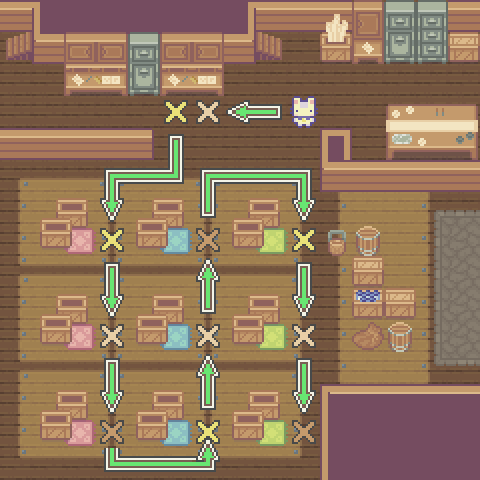
Code Solution
import player
import datetime
from datetime import timezone, timedelta

# Preset Dates and times

timezone = timezone(timedelta(hours=-5, minutes=00))

red_date = datetime.datetime(2026, 6, 24, 8, 30, 15, 742851,timezone)

blue_date = datetime.datetime(2026, 7, 6, 10, 15, 0, 742851,timezone)

green_date = datetime.datetime(2026, 7, 13, 15, 0, 30, 742851,timezone)

player.turn_right()
player.move_forward(3)
player.turn_right()
await player.read()

today = str(datetime.datetime.now())

await player.display(today)

player.turn_left()
player.move_forward()
player.turn_right()

start = datetime.datetime(month = 6, day = 14 , year = 2026)

end = datetime.datetime(month = 7, day = 23 , year = 2026)

result = str(end-start)

await player.write(result)

player.turn_right()
player.turn_right()
player.move_forward(2)
player.turn_right()
player.move_forward(2)
player.turn_left()
player.move_forward(2)
player.turn_right()

red_days = str(red_date.date())

await player.write(red_days)

player.turn_left()
player.move_forward(3)
player.turn_right()

red_time = str(red_date.time())

await player.write(red_time)

player.turn_left()
player.move_forward(3)
player.turn_right()

red_timestamp = red_date.timestamp()

await player.display(red_timestamp)

player.turn_left()
player.move_forward()
player.turn_left()

player.move_forward(3)

player.turn_left()
player.move_forward()
player.turn_left()

blue_weekday = blue_date.strftime("%a")
blue_day = blue_date.strftime("%d")
blue_month = blue_date.strftime("%B")

await player.write("%s %s %s" %
  (blue_weekday,blue_day,blue_month))

player.turn_right()
player.move_forward(3)
player.turn_left()

blue_hour = blue_date.strftime("%I")
blue_minute = blue_date.strftime("%M")
blue_meridian = blue_date.strftime("%p")

await player.write("%s %s %s" %
  (blue_hour,blue_minute,blue_meridian))

player.turn_right()
player.move_forward(3)
player.turn_left()

blue_local_date = blue_date.strftime("%x")
blue_local_time = blue_date.strftime("%X")

await player.display("%s %s %s" %
  (blue_local_date,blue_local_time,blue_meridian))

player.turn_right()
player.move_forward(2)
player.turn_right()
player.move_forward(3)
player.turn_right()
player.move_forward(2)
player.turn_right()

green_day = str(green_date.strftime("%j"))

await player.write(green_day)

player.turn_left()
player.move_forward(3)
player.turn_right()

green_week = str(green_date.strftime("%U"))

await player.write(green_week)

player.turn_left()
player.move_forward(3)
player.turn_right()

green_timezone = green_date.strftime("%z")

await player.write(green_timezone)