 Coding for Kids
Teacher's Guide
Chapter 4 / Level 1: While Loops
Teaching Objective:
- Learn how to use
whileloops - Understand how loops work
- Being aware of infinite loops can impact your code negatively
Guide
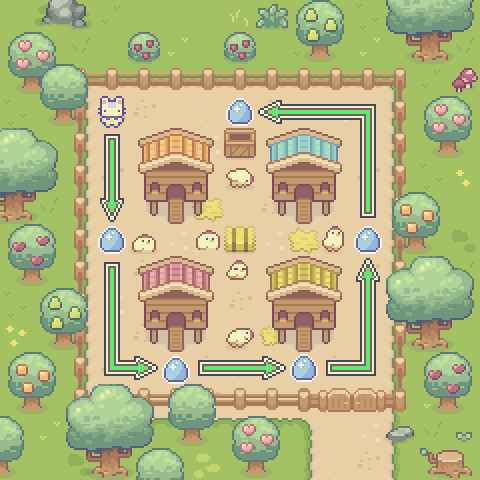
In order to complete this level, you must collect all our eggs in the barn by only having six lines of code written in the code editor. In order to do this you must set up a variable named count and use a while loop to repeat a set of movement codes.
count = 0

while count < 4:
    player.move_forward(8)
    player.turn_left()
    count += 1
The variable count is set to 0 and used to determine how many cycles the loop should run.
The while loop uses count to test if it should perform the loop cycle or not.
The indented movement code that follows is the code that should repeat for as long as the while condition returns true.
The variable count is increased by 1 in order to meet the condition for the loop to finalize.
Remember you must indent the code that comes after the loop code in order for it to be part of the loop, otherwise the code won’t loop.
Caution
The while loops can fall into what is called an infinite loop, this means the code is repeated forever causing your program to get stuck and crash. In order to prevent this from happening it’s always important to set up a cap or a stopping point. For the purpose of this exercise, we use the count variable to cap the number of cycles to prevent an infinite loop from happening.
Map overview and path
Code Solution
import player

count = 0

while count < 4:
    player.move_forward(8)
    player.turn_left()
    count += 1