 Coding for Kids
Teacher's Guide
Chapter 10 / Level 2: JSON Module
Teaching Objective:
- Student understands what are JSONs and how they relate to data storage
- Learns how to use the JSON functions and how to pack and unpack data types
- Understands the benefits of using JSONs and the nuances of organizing data
Guide
In this exercise we’ll be working with the Json module, this module allows you to use JSON ( JavaScript Object Notation) which is a language independent format used for data storage and transmission. To activate the use of the module we must use import json , and for this exercise we’ll be using the following functions from it:
json.loads(): Converts JSON string into a Python data, takes one argument, that being the string you wish to parse into Python.json.dumps(): Converts Python data into JSON string object, this function can take up to four(4) arguments, only the first one is a requirement to use the function. They are as follows.- Python data you wish to convert into JSON: they can be of the following data types: dictionaries, lists, tuples, string, integer, float, boolean, and None data types.
indent: number of spaces you’d like to add at the beginning of the data pointseparators: these are the portions you would like to appear between and/or at the end of data points.sort_keys: sorts dictionary keys alphabetically if you’re converting a dictionary file type.
In this level our objective is to store data properly in the service station using the Json module. Walk to the gold X mark and use read() to view keys and make note og them. walk to light X mark and format the transmission constant using the json.dumps() function. Afterwards set up a dictionary named load and use json.loads() to load up the json data and make it usable as a dictionary.
transmission = json.dumps(transmission)

load = json.loads(transmission)
Use the keys that you previously noted to fill in the blanks for the speak() functions and display the dictionary values.
player.speak(load[-insert value-])

player.speak(load[-insert value-])

player.speak(load[-insert value-])
Walk to the light X mark over the green carpet and use read() , use the data read and insert the missing values in the pre-written dictionary.
profile = {
"Product": -inser value-,
"Amount": -inser value-,
"Sector": -inser value-
}
Walk to dark X mark over green carpet and create Json object named transfer and populate it with json.dumps() with profile dictionary. Use pre-written display() function and add the transfer json object.
Walk to dark X mark over red carpet and use read() , there is a constant named red_data that holds the unformatted data you read. Create json object named red_storage and populate it with json.dunps(). Add red_data as first argument which is the data you’ll be working with. Add indent as 5 as the second argument, add separators as ("- ", " = ") for the third argument. Like this: red_storage = json.dumps(red_data, *indent*=5, *separators*=("- ", " = ")) . Use pre-written display() function and add the red_storage json object to format the data.
Walk to dark X mark over blue carpet and use read() , there is a constant named blue_data that holds the unformatted data you read. Create json object named blue_storage and populate it with json.dunps(). Add blue_data as first argument which is the data you’ll be working with. Add indent as 4 as the second argument, add separators as (".0", " = ") for the third argument, add sort_keys as True for the final argument, like this: sort_keys=True. Use pre-written display() function and add the blue_storage json object to format and sort the data in order to complete the level.
Map overview and path
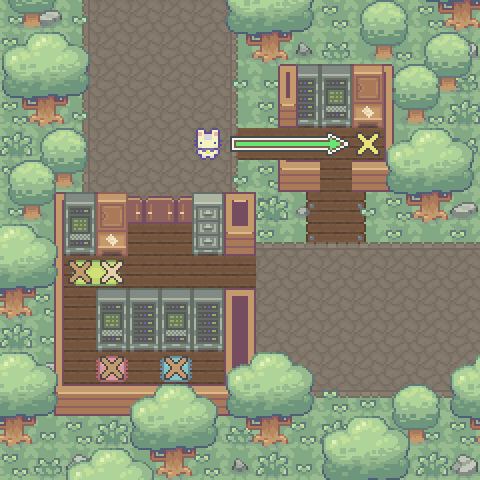
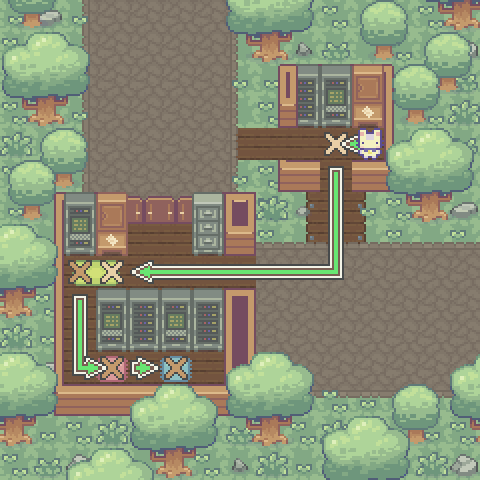
Code Solution
import player
import json

player.turn_left()
player.move_forward(5)
player.turn_left()
await player.read()
player.turn_left()
player.move_forward()
player.turn_right()

transmission = json.dumps(transmission)

load = json.loads(transmission)

# Use speak() function with load and the keys you noted

player.speak(load["system"])

player.speak(load["setup"])

player.speak(load["version"])

player.turn_left()
player.turn_left()
player.move_forward(4)
player.turn_right()
player.move_forward(7)
player.turn_right()

await player.read()

profile = {
  "Product": "weat",
  "Amount": 108,
  "Sector": "22b"
}

transfer = json.dumps(profile)

player.turn_left()
player.move_forward()
player.turn_right()

await player.display("Merchandise Profile:\n%s"
  % (transfer))

player.turn_left()
player.turn_left()
player.move_forward(3)
player.turn_left()
player.move_forward()
player.turn_left()

await player.read()

red_storage = json.dumps(red_data, indent=5, separators=("- ", " = "))

await player.display("Logistics Manifest:\n%s"
  % (red_storage))

player.turn_right()
player.move_forward(2)
player.turn_left()

await player.read()

blue_storage = json.dumps(blue_data, indent=4, separators=(".0", " = "), sort_keys=True)

await player.display("Inventory Manifest:\n%s"
  % (blue_storage))