 Coding for Kids
Teacher's Guide
Chapter 10 / Level 4: Struct Module
Teaching Objective:
- Student understands the difference between the struct module and other serialization modules learned in this chapter
- Learns the various struct functions, their specific syntax and uses
- Understands how to micromanage serialization using the struct module and it’s benefits for doing so
Guide
In this exercise we’ll be working with the struct module, this is a serilization module that will afford us a lot of control over how individual data points are packed and unpacked from a data structure. In order to access the module’s functions use import struct for our purposes we’ll be using the following functions:
struct.calcsize(): Determines how many bytes is packed a given format string, it takes one (1) argument being the format you’d like to verify it’s byte size. The format’s we’ll be using are:- ◦ integer: represented as
'i'is the format for data represented in whole numbers - ◦ float: represented as
'f'is the format for data represented in decimal numbers - ◦ double: represented as
'd'is the format for data represented in more complex decimal numbers where the float format is insufficient.
- ◦ integer: represented as
struct.pack(): Serializes data in binary, packed in a format of your choosing. You can takes two (2) or more arguments, that being the format you wish to use and the values you would like to serialize. The formats are the ones previously outlined and you must add them corresponding to the amount of arguments you add.struct.unpack(): Deserializes packed binary data, takes two (2) arguments, the format in which it needs to be comparable to the format it was serialized in, and the second is the data that was serialized.struct.iter_unpack(): Deserializes packed binary data, works the same way asstruct.unpack()but iterates through each data block individually through the use of a loop.struct.pack_into(): An advanced version ofstruct.pack(), takes four (4) arguments which would be the format you would like to use, the data buffer you’d like to put the data into, the position in the buffer you’d like the data to occupy, and finally the data you’re packing.struct.unpack_from(): An advanced version ofstruct.unpack(), takes three (3) arguments : the format you would like to use, the data buffer you’d like to unpack and lastly the location in the buffer you would like to unpack. This allows you to unpack specific portions of the data.
The objective of the level is to apprise the data in the service station for the new farmland construction. Walk to the light X mark, create three variables named integer , float and double for each you will store the value of struct.calcsize() and add as an argument 'i' , 'f' and 'd' respectively. These are byte formats that . This will calculate the size in bytes for each formats coresponding to the names of each variable.
integer = struct.calcsize('i')
float = struct.calcsize('f')
double = struct.calcsize('d')
Place the variables in the pre-written write() variable.
Walk to gold X mark and read() , make notes of the information as it’s going to be be packed and serialized. Create a variable named blue_data and store the value of struct.pack() , as arguments add the format of all three (3) read data points together, followed by all three (3) data points seperated by comas, or as each individual argument.
blue_data = struct.pack('-insert value-', -insert value- , -insert value- , -insert value-)
Use the display() function with blue_data as an argument to display the packed binary data.
Walk to dark X mark over blue carpet, create a variable named blue_unpack and store the value of struct.unpack() , as arguments set the same format as how you packed it and blue_data which is the data you wish to unpack. Use the write() function with blue_unpack as an argument to verify the unpacked data.
In the same location, use the pre-written for loop with the struct.iter_unpack() function and add as arguments the same arguments you added to struct.unpack() .
Walk to the gold X mark over the red carpet and use the read() function, make note of the data as it will be packed and serialized.
Walk to the light X mark over the red carpet, create an object named buffer and store the value of bytearray(16) , this will create a sequence of bytes 16 long. Use the struct.pack_into() function, three (3) times and as arguments place the data points previously read. First the format, followed by the destination where you wish to pack the data which is buffer . For the last two arguments add the position where you wish to pack the data within the byte array and the final argument is the data you wish to pack.
buffer =bytearray(16)
struct.pack_into('i', buffer,0,82)
struct.pack_into('-insert value-', buffer, -insert value-, -insert value-)
struct.pack_into('-insert value-', buffer, -insert value-, -insert value-)
Use the display() function to display the buffer object to verify the serialized data.
Walk to the dark X mark over the red carpet, write down three (3) variables: lettuce , carrots and melons . In each store the value of struct.unpack_from() and as arguments set the data you used to pack them. For the first argument set the format, the second add the data you wish to unpack and for the third set the position you wish to unpack.
lettuce = struct.unpack_from('-insert value-', buffer, -insert value-)
carrots = struct.unpack_from('-insert value-', buffer, -insert value-)
melons = struct.unpack_from('-insert value-', buffer, -insert value-)
Add the lettuce , carrots and melons variables to the pre-written write() function in order to verify the data and complete the level.
Map overview and path
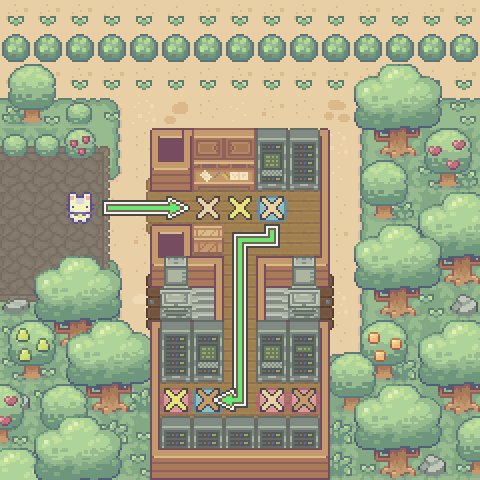
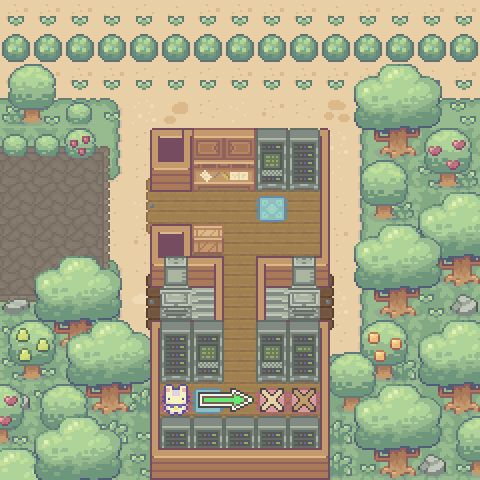
Code Solution
import player
import struct


player.turn_left()
player.move_forward(4)
player.turn_left()

integer = struct.calcsize('i')

float = struct.calcsize('f')

double = struct.calcsize('d')

await player.write("Integer: %s\nFloat: %s\nDouble: %s"
  % (integer,float,double))

player.turn_right()
player.move_forward()
player.turn_left()

await player.read()

player.turn_right()
player.move_forward()
player.turn_left()


blue_data = struct.pack('ifd', 52 , 46.32 , 72.85720018)

await player.display(blue_data)

player.turn_right()
player.turn_right()
player.move_forward()
player.turn_right()
player.move_forward()

player.turn_left()
player.move_forward(5)
player.turn_right()
player.move_forward()
player.turn_right()

blue_unpack = struct.unpack('ifd', blue_data)

await player.write(blue_unpack)

for values in struct.iter_unpack('ifd', blue_data):
  player.speak(values)

player.turn_left()
player.move_forward()
player.turn_right()

await player.read()

player.turn_right()
player.move_forward(3)
player.turn_left()

buffer = bytearray(16)
struct.pack_into('i', buffer, 0, 82)
struct.pack_into('f', buffer, 4, 908.4)
struct.pack_into('d', buffer, 8, 2042.274632678)

await player.display(buffer)

player.turn_right()
player.move_forward()
player.turn_left()

lettuce = struct.unpack_from('i', buffer, 0)

carrots = struct.unpack_from('f', buffer, 4)

melons = struct.unpack_from('d', buffer, 8)

await player.write("Data collection: Lettuce-%s , Carrots-%s , Melons-%s"
  % (lettuce,carrots,melons))