 Coding for Kids
Teacher's Guide
Chapter 10 / Level 3: Marshal and Pickle Modules
Teaching Objective:
- Student learns about python specific serializations and how they’re different from other modules
- Learns the various serialization functions and their specific use cases
- Understands when it’s best to use Marshal or Pickle module functions
Guide
In this exercise we’ll be working with the marshal and pickle serialization modules as well as the pprint module for formatting purposes. These are serialization modules specific to python, the marshal module designed for speed and the pickle module designed for complex python objects.
To use the Marshal and Pickle modules, import their functions by writing: import marshal and import pickle. For our purposes, we’ll be using the following functions:
marshal.dumps(): Serializes data into a binary format, designed for speed within the python. Takes one argument, that being the data you wish to serialize, is limited to basic data types.marshal.loads(): Deserializes binary data into python readable data types, limited in it’s capabilities but fast execution. Takes one argument, that being the data to deserialize.pickle.DEFAULT_PROTOCOL: Checks what protocol version for Pickle serialization is default in your Python version. The protocols affect how the data is serialized.pickle.HIGHEST_PROTOCOL: Checks what protocol version for Pickle serialization is the highest available in your Python version. The protocols affect how the data is serialized.pickle.dumps(): Serializes complex python data structures in binary format according to the protocol used. Takes two arguments, the data you wish to serialize and the protocol version you wish to use when serializing.pickle.loads(): Deserializes binary data into python readable data types, powerful in scope for python objects. Takes one argument, that being the data you wish to deserialize.
For pprint,we will import it using from pprint import pformat . This allows us to use the function pformat() which can be used to format data structures like dictionaries allowing us to display the information clearly.
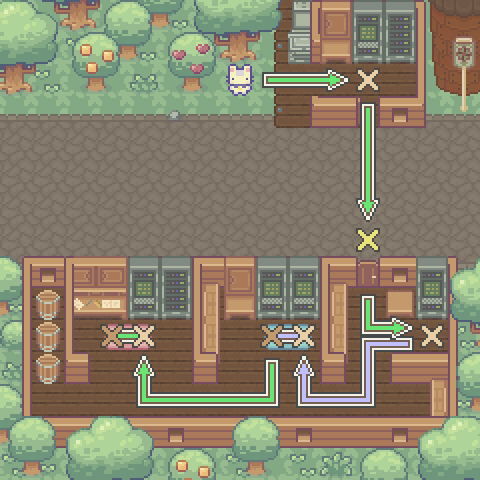
The objective of this level is to collect some water and soil data by serializing and deserializing it then storing it. There is a constant named reading that holds data collected by the monitoring station. Walk to the light X mark and create variable named data and store the value of marshal.dumps() function with reading as an argument.
Use the data variable with the pre-written display() function to display the serialized data.
data = marshal.dumps(reading)

await player.display("Station Data:\n%s"
  % (data))
Walk to gold X mark and open() the door to the office building, continue walking to the light X mark. Create variable named output, store the value of marshal.loads() and add data as an argument. Use the write() function while over the X mark and add output as an argument.
output = marshal.loads(data)

await player.write(output)
Walk to light X mark over blue carpet, write pickle.DEFAULT_PROTOCOL & pickle.HIGHEST_PROTOCOL as arguments for the pre-written write() function to display protocol versions.
Walk to dark X mark over blue carpet, there is a constant named samples that holds the data collected over the past few months. Create three variables named seral_0, sereal_2 and sereal_5 . In each store the value of pickle.dumps() and add samples as an argument as well as protocol with the number corresponding to the variable. For example:
sereal_0 = pickle.dumps(samples, protocol=0)
Do the same for the other two variables. Use the pre-written display() function and add seral_0, sereal_2 and sereal_5 as arguments.
Walk to the light X mark over the red carpet, overwrite the output variable, store the value of pickle.loads() with sereal_5 as an argument. Use the pre-written display() function and add the pformat() function with output as an argument. Make note of the ratings displayed.
output = pickle.loads(sereal_5)

await player.display(pformat(output))
Walk to the dark X mark over the blue carpet, on the pre-written write() function add the ratings displayed in the previous data pull in order to complete the level.
Map overview and path
Code Solution
import player
import marshal
import pickle
from pprint import pformat

player.turn_left()
player.move_forward(4)
player.turn_left()

data = marshal.dumps(reading)

await player.display("Station Data:\n%s"
  % (data))

player.turn_left()
player.turn_left()
player.move_forward(5)

player.open()

player.move_forward(3)
player.turn_left()
player.move_forward(2)
player.turn_left()

output = marshal.loads(data)

await player.write(output)

player.turn_left()
player.move_forward(2)
player.turn_left()
player.move_forward(2)
player.turn_right()
player.move_forward(2)
player.turn_right()
player.move_forward(2)

await player.write("Default protocol: %s\nHighest protocol: %s"
  % (pickle.DEFAULT_PROTOCOL , pickle.HIGHEST_PROTOCOL))

player.turn_left()
player.move_forward()
player.turn_right()

sereal_0 = pickle.dumps(samples, protocol=0)
sereal_2 = pickle.dumps(samples, protocol=2)
sereal_5 = pickle.dumps(samples, protocol=5)

await player.display("Serialized protocol 0: %s\nSerialized protocol 2: %s\nSerialized protocol 5: %s\n"
  % (sereal_0,sereal_2,sereal_5))

player.turn_left()
player.turn_left()
player.move_forward(2)
player.turn_right()
player.move_forward(4)
player.turn_right()
player.move_forward(2)

output = pickle.loads(sereal_5)
await player.display(pformat(output))

player.turn_left()
player.move_forward()
player.turn_right()

await player.write("Jan: %s, Feb: %s, Mar: %s, Apr: %s"
  % ("F","C","B","A"))