 Coding for Kids
Teacher's Guide
Chapter 3 / Level 3: String Formats
Teaching Objective:
- Student learns how to use operators with strings.
- Understands how to interface strings with numbers and it’s uses.
- Learns the syntax for using operators and
%dwith strings.
Guide
Walk to the first X mark and call out the chickens in the barn by using the speak() function. Write the word “Chirp” and multiply it by 10 to chirp ten times.
player.speak("Chirp" * 10)
Count how many chickens are in each coup and store the numbers inside variables named: left_coup, right_coup.
left_coup = 5
right_coup = 6
After setting up the variables head for each of the X marks in front of each coup and call out the number in each using the variables. Write the string "Right Coup has %d Chickens" , the %d is where the number of chickens is being inserted in the string. You follow this up by inputting the variable you wish to use in the string: % (right_coup)
player.speak("Right Coup has %d Chickens" % (right_coup))
# This will print on screen “Right Coup has 6 Chickens”

.......

player.speak("Left Coup has %d Chickens" % (left_coup))
# This will print on screen “Left Coup has 5 Chickens”
After calling out the number of chickens associated with each coup the student will have successfully completed the level.
Map overview and path
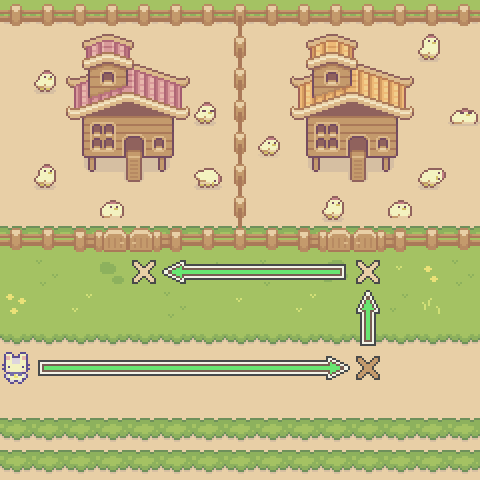
Code Solution
import player

player.turn_left()
player.move_forward(11)
player.turn_left()
player.speak("Chirp" * 10)
right_coup = 6
left_coup = 5
player.move_forward(3)
player.speak("Right Coup has %d Chickens" % (right_coup))
player.turn_left()
player.move_forward(7)
player.turn_right()
player.speak("Left Coup has %d Chickens" % (left_coup))