 Coding for Kids
Teacher's Guide
Chapter 8 / Level 3: Math Module Intro
Teaching Objective:
- Student understands the uses and benefits of importing the math module
- Learns the implementations and syntax of math module functions
- Understands the differences between normal math operations and math module operations and how they can compliment each other
Guide
In this exercise we will be using the math module, specifically several functions allowing us to identify numeric properties as well as doing complex math calculations.
import math
Specifically we’ll be using the following functions, there are also many more the module gives us access to, some of which we’ll be reviewing in upcoming levels.
math.isnan(): Checks if value input is not a numbermath.isinf(): Checks if value input is an infinite numbermath.isfinite(): Checks if value input is finitemath.prod(): Multiplies all arguments addedmath.pow(): Takes two arguments and returns the value of the first argument by the power of the second argument.math.trunc(): Tunicates argument provided, this removes the decimal from a float point number, making it a whole number. (Does not round, just removes)math.copysign(): Takes two arguments, copies the sign (-,+) from the second argument and applies it to the first one.math.factorial(): Takes an argument and sums the multiplication of that number counting down to 1. For example, if the value is 5 it goes: 5 x 4 x 3 x 2 x 1 and produces a result.
math.isnan(): Checks if value input is not a numbermath.isinf(): Checks if value input is an infinite numbermath.isfinite(): Checks if value input is finitemath.prod(): Multiplies all arguments addedmath.pow(): Takes two arguments and returns the value of the first argument by the power of the second argument.math.trunc(): Tunicates argument provided, this removes the decimal from a float point number, making it a whole number. (Does not round, just removes)math.copysign(): Takes two arguments, copies the sign (-,+) from the second argument and applies it to the first one.math.factorial(): Takes an argument and sums the multiplication of that number counting down to 1. For example, if the value is5it goes:5x4x3x2x1and produces a result.
To start off, walk to the dark X mark over the red carpet, there are three existing list constants: red_schematics , green_schematics , blue_schematics . Use red_schematics to in a loop to identify each element of the list constant using math.isnan() and math.isinf() .
for x in red_schematics :

    y = math.isnan (float(x))

    if y == True:
        player.speak("Not a Number")
    else:
        y = math.isinf(float(x))

        if y == True:
            player.speak("Is infinite")
        else:
            player.speak(x)
Create new variable named red_values , use list comprehension with math.isfinite() to remove unwanted elements. Use math.prod() to multiply all elements.
red_values = [x for x in red_schematics if math.isfinite(float(x))]

red_values = math.prod(red_values)
At the green and blue carpet X marks, do the same process using green_schematics , blue_schematics list constants and create new variables green_values and blue_values and use them in the same manner as the red_values previously. Walk to the gold X mark and use pre-written write code to chart down the numbers.
Walk to light X mark to access next room using open() . Continue walking to light X mark in front of the crate in the next rom and use read() to acquire data. Walk to dark X mark over purple carpet, create variable named purple_data and use math.pow() with the data you read to have it to power of 3 . Use math.trunc() to remove the result’s decimal, use write() with purple_data to chart it all down.
purple_data = math.pow( -insert data- , 3 )
purple_data = math.trunc(purple_data)

await player.write(
    "Land Deeds:\nCoordinates: %s" % (purple_data))
Walk to top light X mark and use read() to acquire data, create two variables: white_data and sign to store in the values. Use math.copysign() with white_data to copy sign, use math.factorial() with an integer of white_data to multiply the data using the variable itself. Use write() with white_data to complete the level.
white_data = math.copysign(white_data,sign)

white_data = math.factorial(int(white_data))

await player.write(
    "Land Deeds:\nCoordinates: %s" % (white_data))
Map overview and path
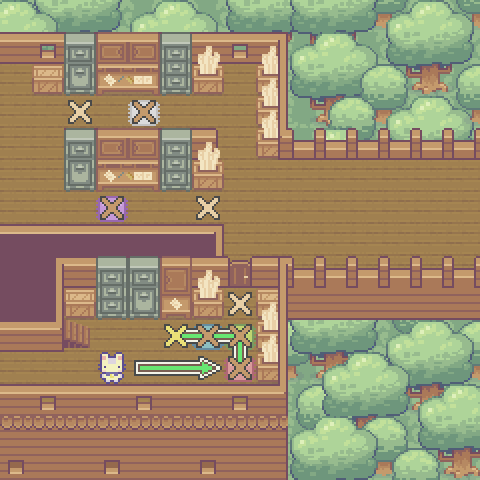
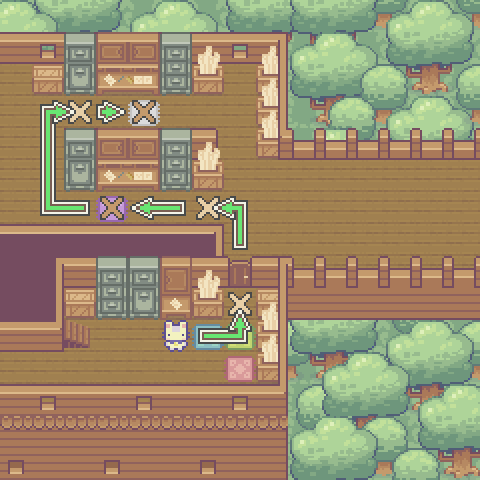
Code Solution
import player

import math

player.turn_left()
player.move_forward(4)

for x in red_schematics :

    y = math.isnan (float(x))

    if y == True:
        player.speak("Not a Number")
    else:
        y = math.isinf(float(x))

        if y == True:
            player.speak("Is infinite")
        else:
            player.speak(x)

# Create list & filter constant with list comprehention

red_values = [x for x in red_schematics if math.isfinite(float(x))]

red_values = math.prod(red_values)

player.turn_left()
player.move_forward()
player.turn_right()

for x in green_schematics :

    y = math.isnan (float(x))

    if y == True:
        player.speak("Not a Number")
    else:
        y = math.isinf(float(x))

        if y == True:
            player.speak("Is infinite")
        else:
            player.speak(x)

# Create list & filter constant with list comprehention

green_values = [x for x in green_schematics if math.isfinite(float(x))]

green_values = math.prod(green_values)

player.turn_left()
player.turn_left()
player.move_forward()
player.turn_right()

for x in blue_schematics :

    y = math.isnan (float(x))

    if y == True:
        player.speak("Not a Number")
    else:
        y = math.isinf(float(x))

        if y == True:
            player.speak("Is infinite")
        else:
            player.speak(x)

# Create list & filter constant with list comprehention

blue_values = [x for x in blue_schematics if math.isfinite(float(x))]

blue_values = math.prod(blue_values)

player.turn_left()
player.move_forward()
player.turn_right()

await player.write("Schematics Data:\nRed Data: %s\nGreen Data: %s\nBlue Data: %s" % (red_values,green_values,blue_values))

player.turn_right()
player.move_forward(2)
player.turn_left()
player.move_forward()

player.open()

player.move_forward(3)
player.turn_left()
player.move_forward()
player.turn_right()

await player.read()

player.turn_left()
player.move_forward(3)
player.turn_right()

purple_data = math.pow( 26.46 , 3 )
purple_data = math.trunc(purple_data)

await player.write(
    "Land Deeds:\nCoordinates: %s" % (purple_data))

player.turn_left()
player.move_forward(2)
player.turn_right()
player.move_forward(3)
player.turn_right()
player.move_forward()
player.turn_left()

player.read()

white_data = -8

sign = 42.4

player.turn_right()
player.move_forward(2)
player.turn_left()

white_data = math.copysign(white_data,sign)

white_data = math.factorial(int(white_data))

await player.write(
    "Land Deeds:\nCoordinates: %s" % (white_data))