 Coding for Kids
Teacher's Guide
Chapter 3 / Level 3: Modifying a Matrix
Teaching Objective:
- Student learns what a matrix is and how they are displayed
- Learns how to modify data inside a matrix and code surrounding it’s operation
- Understands a matrix uses and it’s relation to nested lists
Guide
In this exercise we will be working with Matrixes which are a type of Nested List that each list element is the same length forming a grid with rows and columns.
For this level, bottles need to be stored in a wine rack that already has several bottles already stored. The wine rack is assorted as a Matrix so you must place the bottles in the correct areas within the Matrix.
First walk over and collect all bottles in the field, some bottles are stored inside crates. Walk to the light X marks and use the collect() function to pick up bottles, there are two (2) list constants: lower_crate and upper_crate . Use the constants in combination with the function in the location that corresponds to their name.
player.collect(lower_crate)

player.collect(upper_crate)
Store the number of bottles you’ve collected inside variables named purple_bottle , green_bottle , blue_bottle , yellow_bottle .
purple_bottle = 4

green_bottle = 3

blue_bottle = 6

yellow_bottle = 4
The Matrix is pre-defined in the code editor, in areas where the value is 0 , add the variable that corresponds to the color as is marked on the editor. This is done by adding the name of the Matrix and the position of it’s row and column you wish to add or change a value to. For example, the Matrix starts at position [0][0] and ends at [3][2] .
wine_rack = [
            [5, 0, 2], # purple
            [0, 6, 4], # green
            [2, 4, 0], # blue
            [6, 0, 3]  # yellow
            ]

wine_rack[0][1] = purple_bottle

wine_rack[1][0] = green_bottle

wine_rack[2][2] = blue_bottle

wine_rack[3][1] = yellow_bottle
Once the Matrix is complete, walk to the gold X mark and place() the Matrix on the rack, then display the contents of the Matrix using the speak() function with the Matrix in order to complete the level.
player.place(wine_rack)
player.speak(wine_rack)
Map overview and path
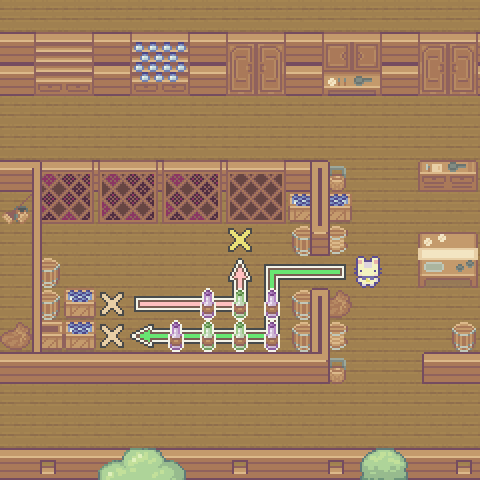
Code Solution
import player

player.turn_right()
player.move_forward(3)
player.turn_left()
player.move_forward(2)
player.turn_right()
player.move_forward(5)
player.collect(lower_crate)
player.turn_right()
player.move_forward()
player.turn_left()
player.collect(upper_crate)
player.turn_left()
player.turn_left()
player.move_forward(4)
player.turn_left()
player.move_forward(2)
purple_bottle = 4
green_bottle = 3
blue_bottle = 6
yellow_bottle = 4
wine_rack = [
            [5, 0, 2], # purple
            [0, 6, 4], # green
            [2, 4, 0], # blue
            [6, 0, 3]  # yellow
            ]
wine_rack[0][1] = purple_bottle
wine_rack[1][0] = green_bottle
wine_rack[2][2] = blue_bottle
wine_rack[3][1] = yellow_bottle
player.place(wine_rack)
player.speak(wine_rack)