 Coding for Kids
Teacher's Guide
Chapter 8 / Level 4: Math Module Extended
Teaching Objective:
- Student learns a brand new set of math module functions
- Learns the implementations and syntax of math module functions centered around angles and measurements
Guide
In this exercise we will once again be working with the math module functions, in this case a brand new set of functions that primarily revolve around angles and measurements. Much like before we start by importing the math module in order to unlock the math functions.
import math
For this exercise we will be using seven more functions available from the math module:
math.radians(): Converts degrees into radians / angles.math.floor(): Rounds number down to a base number.math.ceil(): Rounds number up to a higher number.math.atan2(): Returns the an tangent between two numbers in radiansmath.isclose(): Checks if two numbers are close to each other, returns true/falsemath.fsum(): Adds float point (decimal) numbers together from a list or iterable.math.dist(): Checks the distance between two points, values need to be a lists or iterable.
The objective of the level is to sort and document data for land measurements in the un incorporated areas of the farm. Start off by walking to the light X marks over the blue and red carpets and using read() while facing the crates. The data in the charts is stored in variable constants named: red_x , red_y, blue_x and blue_y .
Walk to dark X mark over the orange carpet and convert blue_x and blue_y into floats and pass them through math.radians() and math.ceil() to convert them into radians and round them up.
blue_x = math.radians(float(blue_x))
blue_x = math.ceil(float(blue_x))

# Do the same for blue_y
Use blue_x and blue_y with pre-written write() function.
Walk to dark X mark over the green carpet and convert red_x and red_y into floats and pass them through math.radians() and math.floor() to convert them into radians and round them down.
red_x = math.radians(float(red_x))
red_x = math.floor(float(red_x))

# Do the same for red_y
Use red_x and red_y with pre-written write() function.
Walk over to the gold X mark and create two new variables: data_a and data_b. Use the data_a variable to store the arc tangent of blue_x and blue_y using math.atan2() . Use the data_b variable to store the arc tangent of red_x and red_y using math.atan2() .
data_a = math.atan2(blue_x,blue_y)

# Do the same with red_x and red_y in data_b
Use data_a and data_b with pre-written write() function.
Walk to dark X mark over purple carpet, create new variable named comparison and store the value math.isclose using data_a and data_b , like this: comparison = math.isclose(data_a, data_b) . Use comparison with pre-written write() function.
Walk to dark X mark over white carpet, create a list named data list and add data_a and data_b . Create variable named total and store the value of math.fsum() using data list as an argument, like this total = math.fsum(data_list) . Use total with pre-written write() function.
Lastly, walk to yellow carpet, convert data_a and data_b into iterables like this: data_a = [data_a] and data_b = [data_b] . Create a variable named distance and store the value of math.dist() using data_a and data_b as arguments, like this: distance = math.dist(data_a , data_b) . Use distance with pre-written write() function in order to complete the level.
Map overview and path
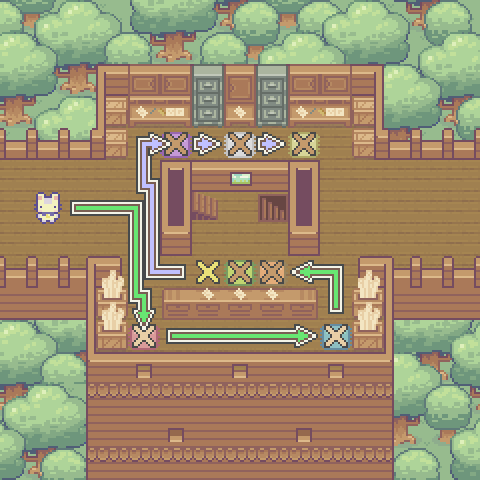
Code Solution
import player

import math

player.turn_left()
player.move_forward(3)
player.turn_right()
player.move_forward(4)
player.turn_right()

await player.read()

player.turn_left()
player.turn_left()
player.move_forward(6)

await player.read()

player.turn_left()
player.move_forward(2)
player.turn_left()
player.move_forward(2)
player.turn_left()

blue_x = math.radians(float(blue_x))
blue_x = math.ceil(float(blue_x))

blue_y = math.radians(float(blue_y))
blue_y = math.ceil(float(blue_y))

await player.write(
  "Point Angle:\nData X: %s\nData Y: %s" % (blue_x, blue_y))

player.turn_right()
player.move_forward()
player.turn_left()

red_x = math.radians(float(red_x))
red_x = math.floor(float(red_x))

red_y = math.radians(float(red_y))
red_y = math.floor(float(red_y))

await player.write(
  "Point Angle:\nData X: %s\nData Y: %s" % (red_x, red_y))

player.turn_right()
player.move_forward()
player.turn_left()

data_a = math.atan2(blue_x,blue_y)

data_b = math.atan2(red_x,red_y)

await player.write(
  "Arc Tangent:\nData A: %s\nData B: %s"%(data_a,data_b))

player.turn_right()
player.move_forward(2)
player.turn_right()
player.move_forward(4)
player.turn_right()
player.move_forward()
player.turn_left()

comparison = math.isclose(data_a, data_b)

await player.write(
  "Realative Distance: %s" % (comparison))

player.turn_right()
player.move_forward(2)
player.turn_left()

data_list = [data_a,data_b]

total = math.fsum(data_list)
await player.write(
  "Total  measurement: %s" % (total))

player.turn_right()
player.move_forward(2)
player.turn_left()

data_a = [data_a]

data_b = [data_b]

distance = math.dist(data_a , data_b)
await player.write(
  "Distance  measurement: %s" % (distance))